
A solo clinician finishes a visit, stops a recording on a phone, reviews an AI generated note, and copies it into the EHR. The workflow feels private because the phone has a passcode and the vendor website says HIPAA compliant. That isn't enough. HIPAA compliance for healthcare providers depends on what the practice documents, who can access each system, which contracts are signed, and what evidence exists if a patient, insurer, or regulator asks questions. A vendor can support compliance. It can't transfer the practice's legal duties to its own product page. The work is manageable for a small practice, but it has to be written down, reviewed, and kept current.
Who HIPAA Applies To in Your Practice
Say a solo dermatologist bills insurers electronically, books patients through a cloud calendar, and records consultations on a phone. That practice is a covered entity. HIPAA then applies to patient information it holds, whether that information sits in software, email, recordings, exports, or paper files.
The definitions in 45 CFR 160.103 drive the next decision. A covered entity includes a healthcare provider that transmits health information electronically in connection with a standard transaction, such as an electronic claim. A business associate is a person or company that creates, receives, maintains, or transmits protected health information for the covered entity.
Sorting People and Vendors
- Covered entity: The practice, clinic, or clinician that provides care and bills electronically.
- Business associate: A billing company, EHR host, transcription service, telehealth platform, cloud storage provider, or AI documentation tool that handles patient data for the practice.
- Workforce member: An employee, trainee, volunteer, or contractor under the practice's direct control who needs role based access and training.
- Subcontractor: A vendor used by a business associate that also touches patient data and needs its own written safeguards.
A practice that takes only cash and never sends claims electronically is generally outside the covered entity definition. That doesn't create a privacy free zone. State privacy laws, professional duties, payment rules, and consent to recording laws may still apply, and telephone or telehealth encounters can trigger stricter state requirements.
Network choices belong in the same review. Staff shouldn't move recordings or notes over an unmanaged guest network, and practices that offer patient connectivity can explore healthcare WiFi security as one part of separating clinical systems from public access.
UK clinicians work under UK GDPR rather than HIPAA. Duties can overlap when a clinician treats patients in both countries or uses a US based service from the UK, so the applicable framework should be documented instead of assumed.
Answer first: Who bills electronically, which vendors touch patient data, and which state laws apply to each encounter type?
Those three answers determine which contracts, policies, safeguards, and patient notices the practice needs before another recording or export is created.
The Privacy, Security and Breach Rules at a Glance
The Privacy Rule is the rulebook for who may see patient information. The Security Rule is the lock and alarm on electronic records. The Breach Notification Rule is the fire drill for when something goes wrong.
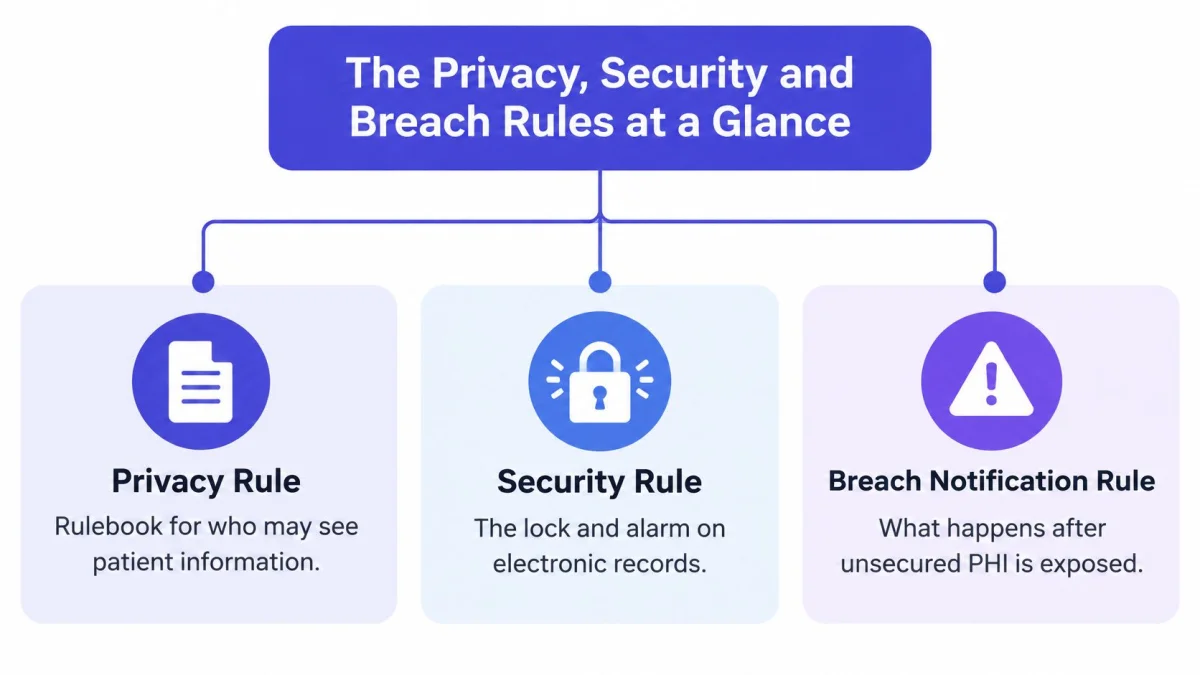
HIPAA developed through several milestones rather than one start date. The HHS Office for Civil Rights enforcement rule page places the Privacy Rule effective date for most covered entities on April 14, 2003, and Security Rule compliance beginning April 20, 2005. The Enforcement Rule was finalized in February 2006, OCR became responsible for enforcing the Security Rule on July 27, 2009, and the 2013 Omnibus Rule strengthened requirements for business associates and subcontractors.
The HIPAA Rules and What Each One Requires
| Rule | What It Governs | Core Duties for Providers | Date |
|---|---|---|---|
| Privacy Rule | Use and disclosure of protected health information | Notice of Privacy Practices, minimum necessary use, patient access to records, workforce training | April 14, 2003 |
| Security Rule | Electronic protected health information (ePHI) | Documented risk analysis, administrative, physical and technical safeguards, unique user logins, audit controls | April 20, 2005 |
| Enforcement Rule | Investigations and civil money penalties | OCR investigations, corrective action and penalty process | February 2006 |
| Breach Notification Rule | Unsecured PHI incidents | Risk assessment after an incident, notice to individuals, HHS and sometimes the media | Notification duties apply after discovery of a breach |
| Omnibus Rule | Business associates and subcontractors | Direct business associate duties, subcontractor agreements | 2013 |
The Privacy Rule duties are practical, not abstract. Patients receive a Notice of Privacy Practices, staff use only the minimum necessary information for a task, patients can request access to their records, and workforce members receive training that matches their roles. These duties fall under 45 CFR Part 164, Subpart E.
The Security Rule, in Subpart C, requires administrative, physical, and technical safeguards for ePHI. It also requires a documented risk analysis. A locked office doesn't compensate for shared logins, and encryption doesn't compensate for staff who can export every record without a clinical reason.
Practices looking for broader safeguards around records, devices, and vendor access can review guidance on reducing healthcare data breach risks and then translate the relevant controls into named practice policies. Generic advice becomes useful only when each control has an owner, a review date, and evidence that it operates.
Create one policy folder with the three main rules listed, then name an owner for privacy, security, and breach response.
Compliance is ongoing because the environment keeps changing. A rule that took effect in 2003 still applies to every new hire, phone, recording workflow, EHR export, and vendor account added this year.
How to Run a HIPAA Risk Analysis
The risk analysis is the core Security Rule duty and the one most small practices skip. 45 CFR 164.308(a)(1)(ii)(A) requires an accurate and thorough assessment of risks to ePHI. The HHS guidance on risk analysis describes a risk based process covering ePHI the provider creates, receives, maintains, or transmits, followed by reasonable and appropriate safeguards against reasonably anticipated threats. It isn't a fixed technology checklist, and it doesn't mandate one encryption product or architecture.
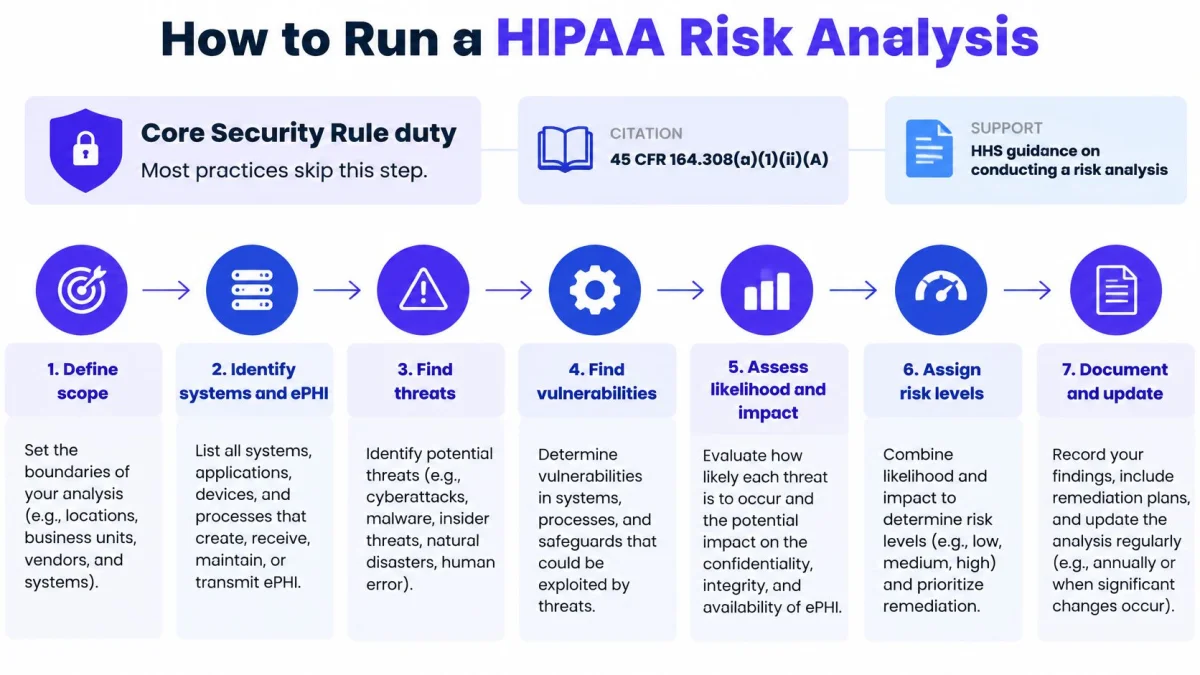
Seven Steps That Produce Usable Evidence
- List every system: Include the EHR, laptops, phones, recording app, email, cloud drives, backups, exports, and archived notes. A finished step names each system, its owner, and the patient data it holds.
- Trace the data lifecycle: Map microphone capture, offline mobile storage, transmission, transcription, model processing, note creation, archive retention, copy and paste into the EHR, backups, and deletion. A finished map shows where a recording can exist after the visit ends.
- Review access: List who can reach each system, give each person a unique login, apply least privilege role based access, and remove accounts nobody uses. A finished review has no shared credentials or former staff access.
- Name realistic threats: Consider a lost phone, reused password, public Wi-Fi, vendor breach, former employee login, or note pasted into the wrong chart. A finished step ties each threat to a specific system and workflow.
- Rate likelihood and impact: Mark each risk high, medium, or low and record the reason in plain language. A finished rating explains why one unprotected phone matters more than a low risk office printer.
- Choose and justify safeguards: Use measures such as unique authentication, audit logging, integrity protections, transmission security, automatic screen locks, encryption, and remote wipe. A finished decision explains fit based on size, capabilities, infrastructure, cost, and the probability and criticality of the risk.
- Document and reassess: Date the analysis, sign it, set a review date, and repeat it when a tool, device, location, or workflow changes. A finished file shows decisions, unfinished fixes, owners, and deadlines.
An AI scribe workflow deserves explicit attention because data moves several times before it becomes a signed note. Offline recording can leave audio on a phone during a signal outage. Synchronization can create a cloud copy. Copy and paste can move the final note into an EHR while the transcript, tasks, and earlier drafts remain in an archive.
PatientNotes stores patient data in secure, HIPAA compliant data centers located in the United States. That fact belongs in the vendor portion of the analysis, alongside access roles, retention, deletion, audit logs, and the practice's own device controls. Readers comparing documentation workflows can use the guide to HIPAA compliant note taking apps as a checklist input, not as a substitute for the practice specific analysis.
Completion test: Every system has an owner, a data flow, a risk rating, a safeguard, and a review date.
Keep the risk analysis and required related documentation for six years under 45 CFR 164.316(b)(2). A vendor BAA or encryption claim doesn't remove the obligation to document training, incident procedures, access decisions, and periodic reassessment.
Breach Deadlines and Your Incident Playbook
A clinician's car is broken into and a laptop holding unencrypted visit recordings is stolen. The practice shouldn't wait for proof that someone opened the files. Under 45 CFR 164.400 to 164.414, an impermissible use or disclosure of unsecured PHI is presumed to be a breach unless a documented risk assessment shows a low probability that the information was compromised.
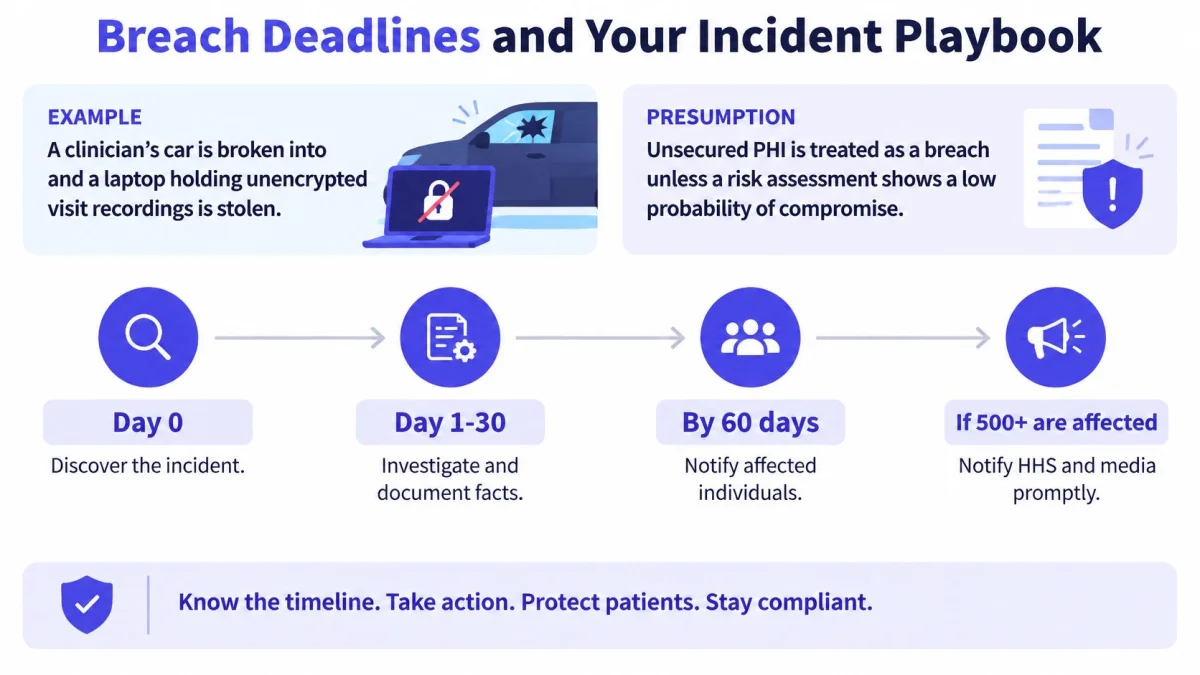
The clock starts at discovery, meaning the first day the breach is known or should reasonably have been known. The HHS breach reporting guidance sets a strict outer limit. Affected individuals must generally be notified without unreasonable delay and no later than 60 days after discovery, and breaches affecting 500 or more individuals must also be reported to the HHS Secretary within that same maximum period.
Breach Notification Deadlines by Breach Size
| Breach Size | Notify Affected Individuals | Notify HHS | Notify Media |
|---|---|---|---|
| Fewer than 500 individuals | Without unreasonable delay, no later than 60 days after discovery | Log and report to HHS within 60 days after the end of the calendar year | Not required |
| 500 or more individuals | Without unreasonable delay, no later than 60 days after discovery | Within 60 days of discovery, through the HHS breach portal | Required when more than 500 residents of one state or jurisdiction are affected, within 60 days |
Each notice should describe, to the extent known, what happened and when, the types of information involved, steps individuals can take to protect themselves, and the organization's investigation and mitigation actions. Staff shouldn't speculate about facts that logs and device records haven't established. A short, accurate notice is better than a reassuring notice that later proves wrong.
Six Actions for the First Response
- Declare the incident: Name the person authorized to start the playbook and contact legal or privacy support.
- Preserve evidence: Protect audit logs, device records, emails, and vendor reports before routine deletion overwrites them.
- Check readability: Determine whether recordings and transcripts were encrypted or otherwise rendered unusable.
- Identify patients: Build the affected list from system records, not memory.
- Coordinate vendors: Require business associates to report facts, affected accounts, containment steps, and discovery dates promptly.
- Track every date: Log discovery, containment, risk assessment, patient notice, and HHS submission in one incident file.
Encryption can materially affect breach handling because notification duties concern unsecured PHI. It doesn't replace access controls, monitoring, containment, or a documented risk assessment. Write the playbook on one page, store it with the compliance file, and walk through it once a year with the people who would use it.
Business Associate Agreements and Vendor Checks
A vendor's HIPAA compliant label doesn't make a practice compliant. The contract does specific legal work that a badge can't do. 45 CFR 164.504(e) requires business associate contract provisions, and the agreement must be in place before patient data flows, including during a trial.
What a BAA Must Cover
- Permitted uses: Defines the uses and disclosures of PHI allowed under the contract.
- Prohibited uses: Bars use or disclosure outside the contract or legal requirements.
- Safeguards: Requires appropriate administrative, physical, and technical protections.
- Incident reporting: Requires reporting of unauthorized uses, disclosures, breaches, and security incidents.
- Subcontractors: Extends equivalent restrictions and safeguards to subcontractors that touch PHI.
- Patient rights support: Supports access and amendment requests where the vendor performs those obligations.
- End of relationship: Provides for return or destruction of PHI where feasible.
Practical vendor oversight also covers people who work outside the office. A remote billing specialist or coder who receives PHI needs the same contractual discipline as software, and practices that decide to hire medical coder support should confirm the BAA, assigned user access, training, and incident reporting route before charts are shared.
PatientNotes operates as a Business Associate under HIPAA. Customers who use the service to process PHI agree to its Business Associate Agreement, which is incorporated into the Terms by reference, and PatientNotes signs a BAA with every customer, including during the free trial, at no extra cost. The useful check is still clause by clause. Request the signed copy, mark each of the seven commitments, and record any missing item as an open vendor risk rather than accepting the label.
The detailed breakdown of HIPAA BAA requirements can support that review. It doesn't replace reading the actual agreement against the actual workflow, especially subcontractors, retention, deletion, and breach reporting timelines.
For UK practices, a BAA doesn't satisfy UK GDPR. The ICO guidance on special category data classifies health information as special category data and requires both an Article 6 lawful basis and a separate Article 9 condition. The health and social care condition requires processing by, or under the responsibility of, a professional subject to professional secrecy, and the processing must be necessary and proportionate.
Ask every vendor three questions. Where is data stored, who can access it, and how are incidents reported?
Record the answers beside the signed agreement. If a vendor can't answer clearly, the practice has found a compliance gap before patient data is exposed.
Common Compliance Gaps and What Enforcement Costs
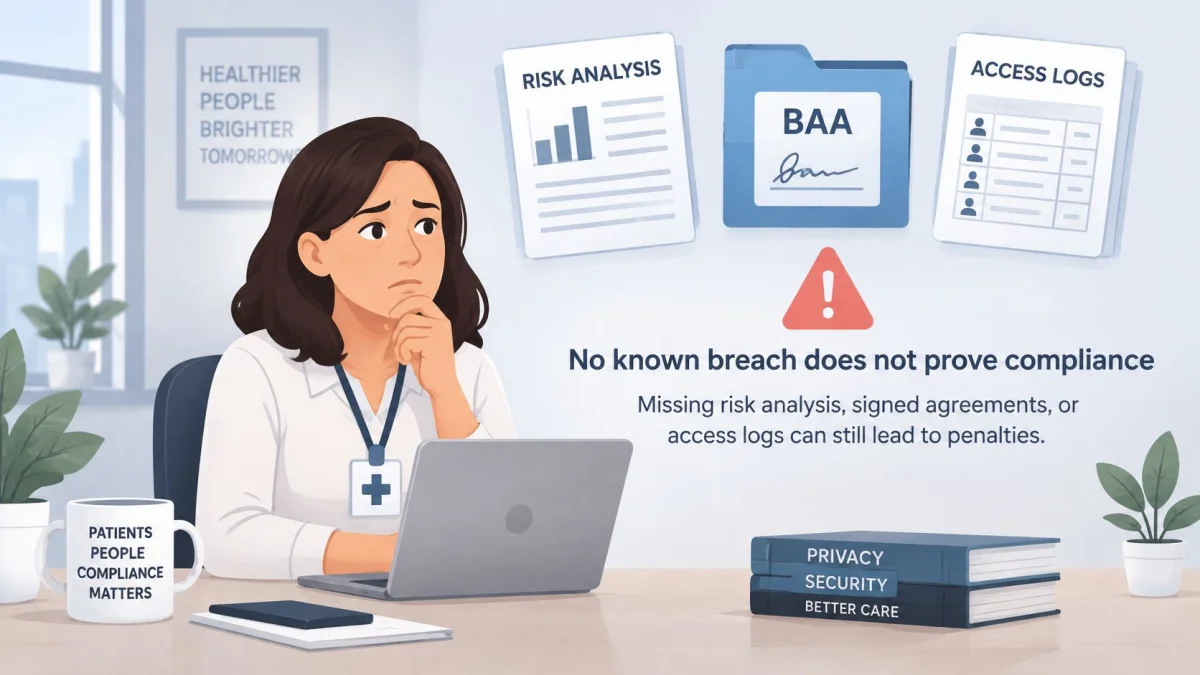
A clean incident record only shows that no breach was detected yet. A practice that cannot produce a risk analysis, signed agreements, training records, or access reviews may have avoided detection rather than built a defensible program. OCR can require corrective action when the underlying safeguards are missing, even if staff believe nothing bad has happened.
The scale is visible in the HHS OCR enforcement highlights: from the Privacy Rule's April 2003 compliance date through October 31, 2024, OCR received more than 374,321 HIPAA complaints, initiated over 1,193 compliance reviews, settled or imposed civil money penalties in 152 cases totaling $144,878,972, resolved more than 31,191 cases through required changes, corrective actions, or technical assistance, and listed a $200,000 penalty in March 2025 for failure to provide timely access to patient records plus a $70,000 penalty in October 2024 involving a dental practice. Access delays carry direct financial exposure. Under 45 CFR 164.524, a practice generally responds to a record request within 30 days, with one 30 day extension allowed when it gives a written reason.
Common Compliance Gaps, Evidence and Fixes
| Common Gap | Evidence to Keep | Fix |
|---|---|---|
| No documented risk analysis | Dated analysis, risk ratings, review log | Complete the analysis, sign it and update it when tools change |
| Vendor without a signed BAA | Signed BAAs and a current vendor list | Sign agreements before any PHI flows, including during trials |
| Shared logins | User list and access review sign-off | Give each clinician a unique login and remove former staff the same day |
| No audit log review | Exported audit logs and monthly review sign-off | Turn on logging and review it each month |
| Late patient access to records | Request log with received and sent dates | Set a 30-day clock and track every request |
| Lost or unencrypted device | Device inventory with encryption status | Encrypt devices, require screen locks and enable remote wipe |
Keep the record that proves each control worked. A vendor's compliance page and a signed BAA are inputs. The practice still has to show its own work. Useful evidence includes dated audit log reviews, failed login checks, export reviews, deleted audio records, restored session logs, device loss reports, signed risk analysis updates, and a patient access request log. Logs that nobody reviews provide weak protection.
For a staff training discussion, the short video below covers why everyday handling decisions matter before an incident becomes a formal investigation.
Start Your Compliance File Within 30 Days
A practice doesn't need a compliance department to make progress. It needs four dated deliverables and a monthly habit that keeps them current.
Week 1 covers vendors. Build a register with columns for the tool, the patient data it touches, whether a signed BAA is on file, the date it was signed, and the named contact. Chase missing agreements before more data flows. The vendor checks earlier are the reference; the register is the deliverable.
Week 2 covers risk. Draft the analysis for the EHR, phones, email, backups, and recording app first, then smaller systems. The deliverable is a signed document with ratings, safeguards, owners, and deadlines.
Week 3 covers people and incidents. Write the one-page incident playbook and train every workforce member with system access. Record each training date. The deliverable is a playbook staff can find without asking the practice owner.
Week 4 covers sign-off. Use the access controls and gap table earlier as your checklist, close any open items, and sign the file with the next review date.
Then set a recurring calendar reminder for the first business day of each month: scan audit logs, check new accounts, confirm patient access requests are on schedule, and verify that BAAs still match the tools in use. Keep a dated record that each control worked in this practice. A vendor badge does not replace it.
Use published vendor materials, such as PatientNotes resources, as a starting reference, then adapt your file to the practice's state law, specialty, and workflow. This week's decision is narrow: confirm the vendor list and signed BAAs before the next patient visit.