
The most common advice about HIPAA compliance for small practices starts with a checklist and ends with a binder. That's not enough. A binder can't show whether a former employee still has access, whether a backup restores, or whether a phone holds an unsynced consultation recording.
A workable approach treats compliance as a recurring operating routine. For a practice with one to five clinicians, that means named owners, practical safeguards, and a dated evidence trail. Software can support that routine, but it can't replace the practice's decisions.
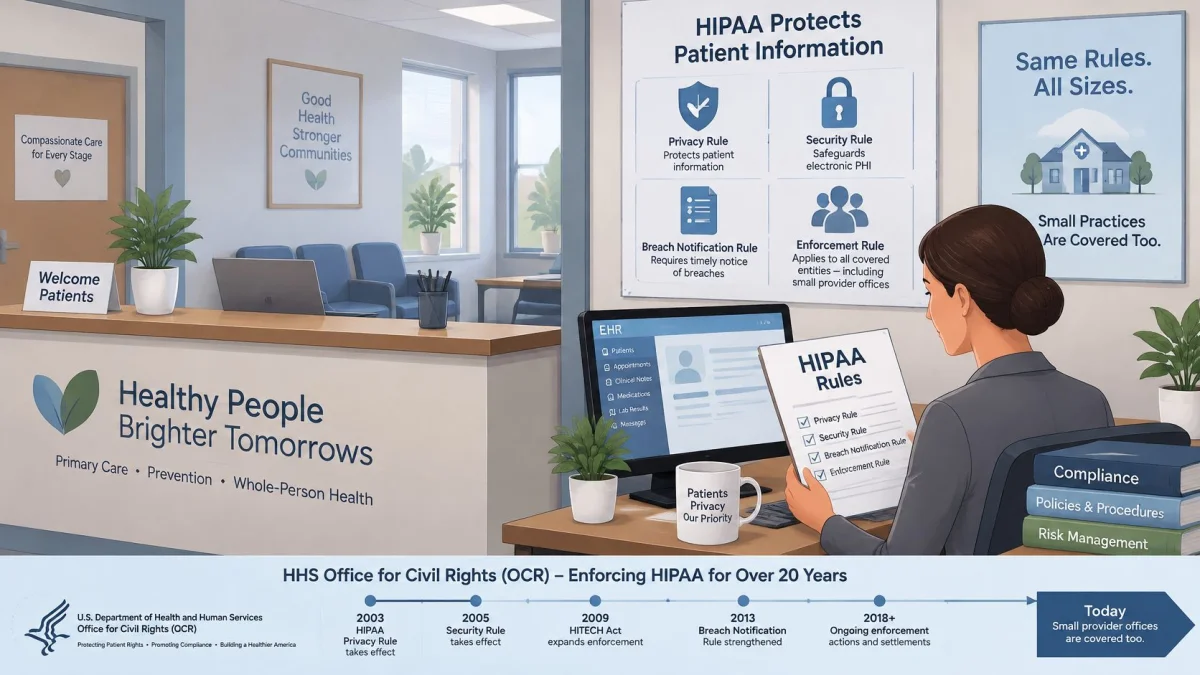
Which HIPAA Rules Apply to Your Practice
Small offices appear in the federal enforcement record. As of September 30, 2024, the HHS Office for Civil Rights enforcement highlights reported 368,305 resolved cases, with investigated organizations including small provider offices. That doesn't mean every complaint leads to a penalty. It does mean headcount isn't a safe reason to assume exemption.
The important distinction is between a covered entity and a business associate. Under the HIPAA definitions reproduced in the Federal Register's Security Rule materials, a covered healthcare provider transmits health information electronically in connection with covered standard transactions. A business associate handles protected health information on behalf of a covered entity.
A solo clinician who submits insurance claims electronically will generally be covered. A practice uncertain about its status should verify the transaction-based definition with HHS rather than assume cash collection, outsourcing, or a small workforce settles the question.
Separate the rules from the job titles
The Privacy Rule governs protected health information and patient rights. The Security Rule addresses electronic protected health information, or ePHI. The Breach Notification Rule governs notification after qualifying breaches. Business associates have duties too, but hiring one doesn't transfer the practice's entire compliance responsibility.
A useful starting inventory distinguishes:
- The practice: The organization responsible for its own policies, workforce, systems, and decisions.
- Business associates: Vendors such as billing services, cloud EHR providers, transcription services, and AI scribes that handle PHI on the practice's behalf.
- Devices and systems: Phones, workstations, storage services, and other places information travels. These need owners, not legal role labels.
UK clinicians need a separate analysis
HIPAA isn't the governing domestic framework for UK practices. The Information Commissioner's Office special-category guidance explains that health-data processing needs an Article 6 lawful basis and an Article 9 condition, including the healthcare condition under Article 9(2)(h) when its safeguards apply. PatientNotes is built by a London-based company, but its HIPAA commitments don't replace a UK practice's UK GDPR analysis.
Civil penalties are tiered under 45 CFR 160.404 and adjusted for inflation. Current HHS amounts are more useful than copied penalty tables.
The Safeguards Your Practice Must Put in Place
HIPAA safeguard requirements for a small practice
| Safeguard | Requirement | Small Practice Example | Citation |
|---|---|---|---|
| Administrative | Security official and risk analysis | Named owner plus a dated risk analysis reviewed each year | 45 CFR 164.308(a)(1) and (a)(2) |
| Administrative | Workforce training | Annual training with signed attendance records | 45 CFR 164.308(a)(5) |
| Administrative | Contingency plan | Tested backup and restore procedure with a written owner | 45 CFR 164.308(a)(7) |
| Physical | Facility access controls | Locked room or cabinet for network equipment, with a visitor sign-in log | 45 CFR 164.310(a) |
| Physical | Workstation security | Locked workstations and screens outside public view | 45 CFR 164.310(b) and (c) |
| Physical | Device and media controls | Encrypted portable devices and secure wiping before disposal | 45 CFR 164.310(d) |
| Technical | Access control | Unique user IDs, role-based permissions, same-day removal of leavers | 45 CFR 164.312(a)(1) and (a)(2)(i) |
| Technical | Automatic logoff, addressable | Sessions end after a documented idle period | 45 CFR 164.312(a)(2)(iii) |
| Technical | Audit controls | Logs showing record access, changes, and exports | 45 CFR 164.312(b) |
| Technical | Integrity and transmission security, encryption addressable | Protected messaging and encrypted telehealth connections | 45 CFR 164.312(c) and (e) |
These examples are operating choices, not verbatim regulatory prescriptions. The Federal Register's HIPAA Security Rule document describes the existing framework and proposed changes, including the distinction between required and addressable implementation specifications.
A required specification must be implemented. An addressable specification isn't an invitation to ignore the issue: the organization evaluates whether it's reasonable and appropriate, documents its decision, and implements an appropriate alternative when warranted. Encryption and automatic logoff fall within that addressable framework.
Make each layer concrete
Administrative safeguards decide who is responsible and how work gets done. The security owner should be able to explain who approves access, who checks backups, and who handles an incident. Annual training and annual risk-analysis reviews are sensible practice schedules, rather than universal calendar wording in the existing rule.
Physical safeguards protect rooms, workstations, and equipment. A secured office doesn't help if a laptop leaves with a staff member. Disposal also deserves a written handoff: the HIPAA disposal guidance from Beyond Surplus provides useful context for planning equipment retirement, while the practice should retain its own asset and destruction records.
Technical safeguards govern access to information and activity within systems. Permission settings should match actual jobs. Audit logging should be enabled and usable, not merely mentioned in a vendor brochure.
The administrative layer is the rulebook, the physical layer is the lock on the door, and the technical layer is the audit log showing who opened what.
Evidence standard: Every safeguard needs something retrievable, such as a dated policy, configuration screenshot, signed training record, or completed test.
For most small practices, encryption is the sensible default. Its relevance to breach notification makes an undocumented decision to leave portable devices unencrypted particularly difficult to defend.
How to Run a Risk Analysis You Can Document
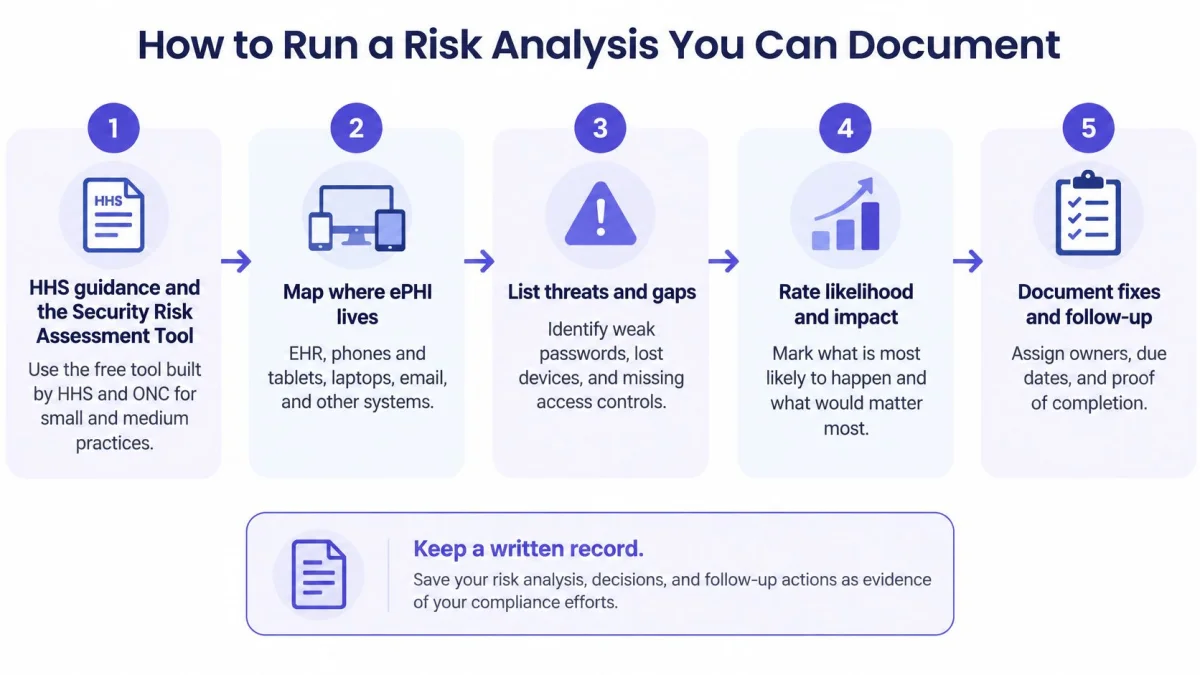
The HHS risk-analysis guidance describes a documented assessment of threats and vulnerabilities affecting ePHI's confidentiality, integrity, and availability under 45 CFR 164.308(a)(1)(ii)(A). HHS and the Office of the National Coordinator built the free Security Risk Assessment Tool for small and medium-sized practices, so cost gives a one to five clinician practice no excuse to skip this work.
HHS prescribes no particular format. A spreadsheet that reflects the practice's actual systems and drives risk-management decisions serves better than a polished template filled with generic entries.
The process should follow the information, not just the EHR.
Build the register around actual work
Map where ePHI lives. Include the EHR, phones, tablets, laptops, email, telehealth, cloud storage, backups, removable drives, and recording apps. Trace creation, receipt, storage, transmission, and deletion so temporary copies show up in the assessment.
Keep findings open until the fix is verified
A clinician records consultations on a phone during unreliable connectivity. Walk that single workflow through the register and it produces several distinct rows: the offline audio file sitting on the device, the screen lock and encryption protecting it, the synchronization that runs when coverage returns, and the deletion that clears the local copy afterward. Each stage gets its own threat, safeguard, and rating. An entry saying only that the cloud vendor is compliant misses everything that happens on the phone itself.
A useful register contains the system, information involved, threat, existing safeguard, likelihood, impact, action, owner, due date, and completion evidence. Closing a finding requires a test result or configuration record a reviewer can pull up later.
This video can support a team discussion before the assessment session.
An HHS proposal to update the Security Rule would make written procedures, review, and cybersecurity expectations more explicit. Until a final rule is published, treat it as direction rather than obligation, and check the Federal Register or HHS for current status before writing proposed provisions into the practice's own requirements.
A finished assessment includes a dated approval, an actionable risk register, and a scheduled review. Keep those three pieces current and the file describes how the practice runs. A document written once and never updated, or limited to the EHR, describes a practice that no longer exists.
Business Associate Agreements and Vendor Checks
A signed business associate agreement, or BAA, doesn't prove that every vendor setting or practice workflow is compliant. It establishes obligations that still need to be checked against actual operations.
The HHS business-associate guidance explains that the agreement must define permitted and required uses and disclosures, prohibit unauthorized uses, require safeguards, and address reporting of unauthorized disclosures, breaches, and relevant security incidents. If a known material violation can't be cured, the covered entity must terminate the relationship when feasible.
That makes the signed agreement more important than the marketing page.
Run a focused vendor review
A practical review can begin in an afternoon, although unresolved answers may take longer:
- Risk and hosting: Request a suitable summary of the vendor's risk-management approach and confirm where information is stored.
- Subcontractors: Identify organizations handling PHI downstream and confirm the required contractual safeguards extend to them.
- Encryption: Confirm protection in transit and at rest, including backups and temporary storage.
- Audit records: Ask what events are logged, how long records remain available, and how the practice obtains them.
- Deletion: Establish retention periods, recording-deletion procedures, and what happens to backups after termination.
- AI use: Confirm whether patient information is used for model training or other secondary purposes.
- Incident escalation: Set a contractual reporting window that allows the practice to investigate and meet its own obligations promptly.
- Exit arrangements: Test whether records can be exported in a usable form before cancellation becomes urgent.
Store answers with the agreement, approval date, and any unresolved conditions. A generic assurance that everything is secure doesn't answer a question about recording retention or access logs.
Match the agreement to the workflow
An AI scribe handling PHI for a covered practice operates as a business associate. Its contract terms become inputs to the practice's own assessment, especially where audio, transcripts, and generated notes follow different retention paths.
PatientNotes operates as a Business Associate under HIPAA. Customers processing PHI agree to its BAA, which is incorporated into the Terms by reference. The HIPAA BAA requirements guide provides a focused checklist for reviewing that agreement.
Telephone workflows deserve the same attention. The BAA requirements for healthcare answering services from Recepta.ai offer context for assessing outsourced call handling, where spoken messages can become recordings, transcripts, or forwarded notifications.
A vendor review is complete when the practice understands the information flow and records its decision, not merely when someone signs the agreement.
For cloud services generally, HHS cloud-computing guidance reinforces that using a service doesn't remove the covered entity's risk-analysis and risk-management responsibilities.
Policies, Training and Access Rules to Write Down
A short policy that staff can follow is more useful than a long template containing procedures the practice doesn't use. Each policy needs an owner, an approval date, a review date, and a clear record of changes.
The policy set should describe the office as it operates, including remote work and personal-device exceptions. Unwritten exceptions are especially difficult to reconstruct after an incident.
Create policies with usable evidence
- Privacy and patient notices: Explain permitted information handling and the route for questions, complaints, and record requests. Keep the approved Notice of Privacy Practices and the practice's distribution procedure.
- Security: Specify device approval, password management, MFA, locking, remote access, and personal-phone restrictions. Retain configuration evidence and written exceptions.
- Access: Define role permissions, approval steps, reviews, and departure handling. Keep requests and removal confirmations rather than relying on memory.
- Sanctions: Describe how suspected violations are investigated and addressed consistently. Limit access to investigation and personnel records.
- Training: Use onboarding and annual refreshers as the practice's schedule, with additional updates after relevant changes. Record attendee names, dates, topics, and a short phishing exercise.
Annual refresher training is an operational recommendation, not a claim that HIPAA specifies that exact interval for every training obligation. The practical objective is that staff understand the current procedures and can demonstrate what to do.
Give record requests an owner and a clock
The HHS HIPAA basics guidance explains that access requests generally require action within 30 days, with a permitted 30-day extension when the required written notice is provided, consistent with 45 CFR 164.524.
Maintain a request register showing receipt, verification, systems searched, assigned owner, deadline, response, and any extension notice. A request shouldn't sit in an unattended general inbox.
The retrieval procedure should map EHR records, phone audio, transcripts, email attachments, cloud files, and AI-generated output. Under the designated-record-set definition in 45 CFR 164.501, the practice should document whether retained audio and drafts are included based on their actual use, rather than assume all drafts are excluded.
The HIPAA documentation guide can support organizing the evidence folder. Keep dated policy versions, staff acknowledgments, training logs, and request records in access-controlled storage.
Under 45 CFR 164.316(b)(2), required Security Rule documentation is retained for six years from creation or when it last was in effect, whichever is later. That documentation rule isn't a blanket medical-record retention period; clinical-record retention needs its own applicable-law analysis.
Low-Cost Controls, Including AI Scribes
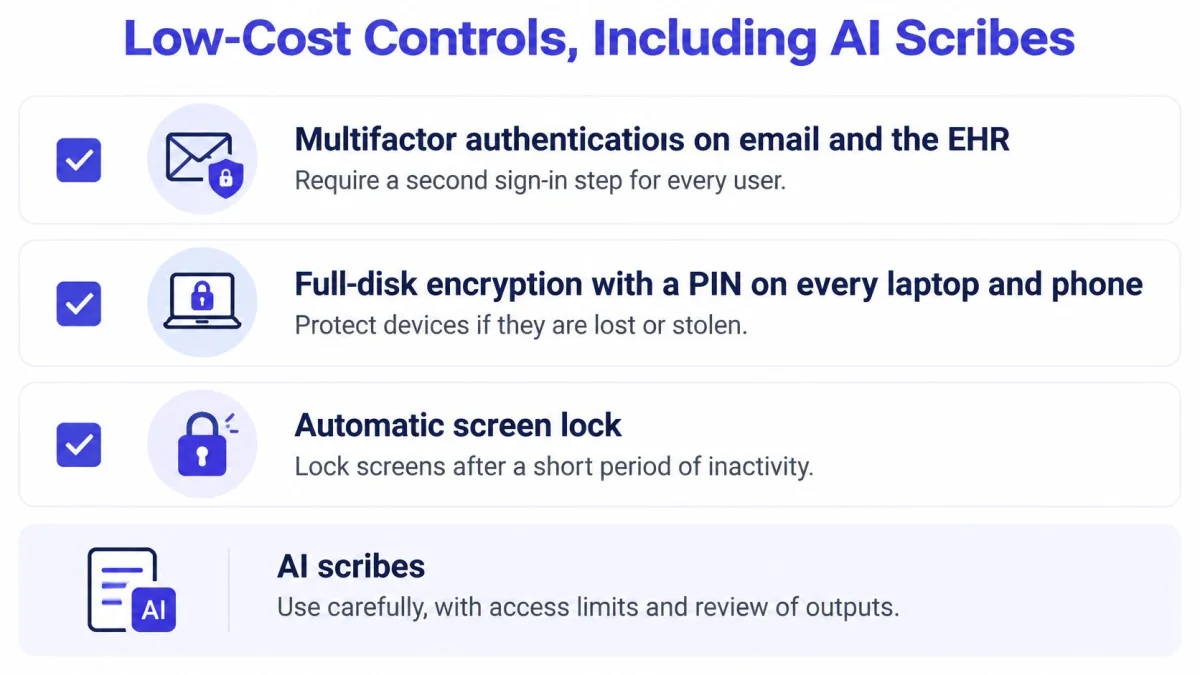
The strongest starting priorities are MFA on email and the EHR, device encryption backed by a strong PIN or password, and automatic screen locking. These controls address common exposure paths without requiring an elaborate security department. They don't justify a promise that incidents can't happen.
For a small practice, the main trade-off is usually administration rather than purchase price. Someone must own recovery codes, device enrollment, backup alerts, and departures.
Use a configuration checklist
Enable MFA for email, the EHR, cloud storage, remote access, and banking. Store recovery methods securely so a lost phone doesn't lock the practice out.
The device checklist should include recording equipment, not only office computers.
Treat recording as a device workflow
A phone holding unsynced consultation audio deserves particular attention. The practice's policy should require encryption, locking, approved remote-wipe capability, and verified removal of local audio after successful upload under its retention policy. Staff shouldn't assume synchronization automatically deletes the local copy.
The HIPAA note-taking apps guide can support a workflow review. Contract terms, storage locations, and deletion arrangements belong in the vendor approval record; device settings belong in the practice's implementation evidence.
PatientNotes stores patient data in secure, HIPAA-compliant data centers in the United States. Patient data is never used to train AI models, and each practice's data is kept strictly separate. Those facts don't establish whether a clinician's own phone is appropriately configured.
Recording rule: The practice should verify the complete path from microphone capture to final record, including temporary local storage.
A prudent documentation policy requires clinician review and approval before generated content enters the final record. Recording notice and consent procedures also need review against applicable state law and professional requirements; no universal consent rule fits every jurisdiction or consultation.
None of these configuration choices replaces an organization-specific risk analysis. Their value comes from addressing identified risks and leaving evidence that they work.
Breach Response and Notification Deadlines
Discovery starts the clock on almost every deadline below, and discovery includes the day the practice reasonably should have known about the incident.
Breach notification deadlines for covered entities and business associates
Situation Notification Required Deadline Breach of unsecured PHI by a business associate Business associate notifies the covered entity Without unreasonable delay and no later than 60 days after discovery Any breach of unsecured PHI Covered entity notifies each affected individual Without unreasonable delay and no later than 60 days after discovery Breach affecting 500 or more individuals Covered entity notifies HHS Same time as individual notice, within 60 days of discovery Breach affecting more than 500 residents of one state or jurisdiction Covered entity notifies prominent media outlets Within 60 days of discovery Breach affecting fewer than 500 individuals Covered entity logs the breach and reports to HHS Within 60 days after the end of the calendar year The HHS Breach Notification Rule guidance sets these deadlines and explains the assessment used to determine whether notification is required. Notify without unreasonable delay; the 60-day date is the outer limit. A practice that confirms a breach on day ten and mails letters on day fifty-nine has already failed the standard, and its incident log will show it.
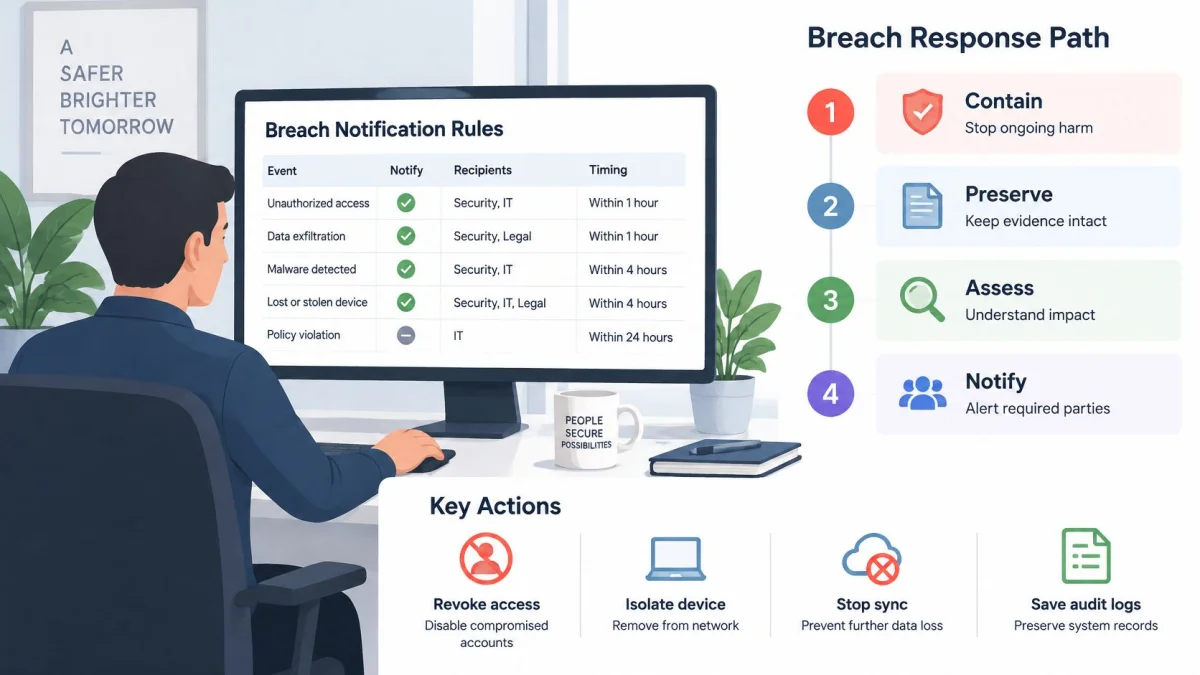
The response plan should name the decision-maker and the evidence file before an incident occurs.
Follow a response sequence
Contain the exposure. Revoke affected sessions or credentials, isolate compromised equipment, and stop unsafe synchronization. Avoid destroying evidence during containment.
Encryption changes the analysis, not the need to investigate
Consider a stolen laptop. Properly encrypted information may fall outside the unsecured-PHI notification framework when the encryption meets applicable HHS guidance and the key hasn't been compromised. An unencrypted laptop requires a different assessment of the exposed information and circumstances.
The practice still needs evidence of encryption status, device contents, account exposure, and the basis for its conclusion.
A misdirected email makes a useful rehearsal scenario. A clinician sends a visit summary to the wrong recipient, or autocomplete fills in a former patient's address. The response team should establish which attachments went out, whether the message was opened, whether recall succeeded, and whether the recipient confirmed deletion. Mail server logs will show delivery. What the recipient did with the file stays unknown until someone asks, and that answer belongs in the incident register.
The readiness test is simple: can staff name the notification decision-maker and locate the incident register without searching through old email? If not, the response procedure needs another rehearsal.
Confirm Your Compliance Plan This Week
Treat the first week as an evidence exercise. By Friday, the practice should have three dated records: a written appointment of the privacy and security owner, an inventory of systems and vendors touching patient information, and a booked risk-analysis session. A solo clinician may hold both roles. Put the appointment in writing anyway and save it with the supporting documents.
The inventory should name each system and vendor, the patient information involved, the staff who use it, and where its agreement and security terms are stored. A recurring calendar then turns that inventory into an operating routine. Give each task an owner, a due date, and a place to save its result, then file the dated record as soon as the task is complete.
Recurring HIPAA tasks for a small practice
Task Frequency Owner Review user access and remove leavers Monthly and on every departure Practice manager Review audit logs for unusual access Monthly Practice owner or IT provider Test a backup restore Quarterly Practice manager or IT provider Update the risk analysis after system or workflow changes At least annually and after any change Practice owner Train all staff on privacy and security At hire and annually Practice owner Review business associate agreements and vendor changes Annually and before any new vendor Practice owner Rehearse the breach and lost-device response Annually Whole team Make the next vendor decision evidence-based
Keeping the current setup may be reasonable if its risks are understood and controlled. Changing a vendor makes sense when unresolved access, export, retention, or incident-reporting limitations prevent the practice from carrying out its procedures. For each gap, record the limitation, the procedure it affects, any workaround, and the decision. That gives the next annual review something concrete to verify.
Before any AI-scribe trial recording, complete the practice's approval, execute the BAA, and read the data-location, encryption, and deletion terms. PatientNotes operates as a Business Associate and signs a BAA with every customer, including during the free trial, at no extra cost. Patient data is stored in secure, HIPAA-compliant data centers in the United States, is never used to train AI models, and is kept strictly separate by practice.
PatientNotes is HIPAA compliant and offers a 7-day free trial with no credit card and a 14-day money-back guarantee. Team pricing is $70 per user per month billed monthly or $50 per user per month billed annually ($600 per year). Only clinicians who record visits need a paid seat, and only clinicians who record are counted in the price. Enterprise plans are custom priced for larger practices and health systems, with volume discounts for organizations with 20 or more providers, custom EHR integrations, and SSO. The resource library provides further implementation guides for assessing the recording workflow.
End the week by booking the first risk-analysis session. Put the owner, attendee list, system inventory, and evidence-folder location in the invitation so the review starts with a date and a record.