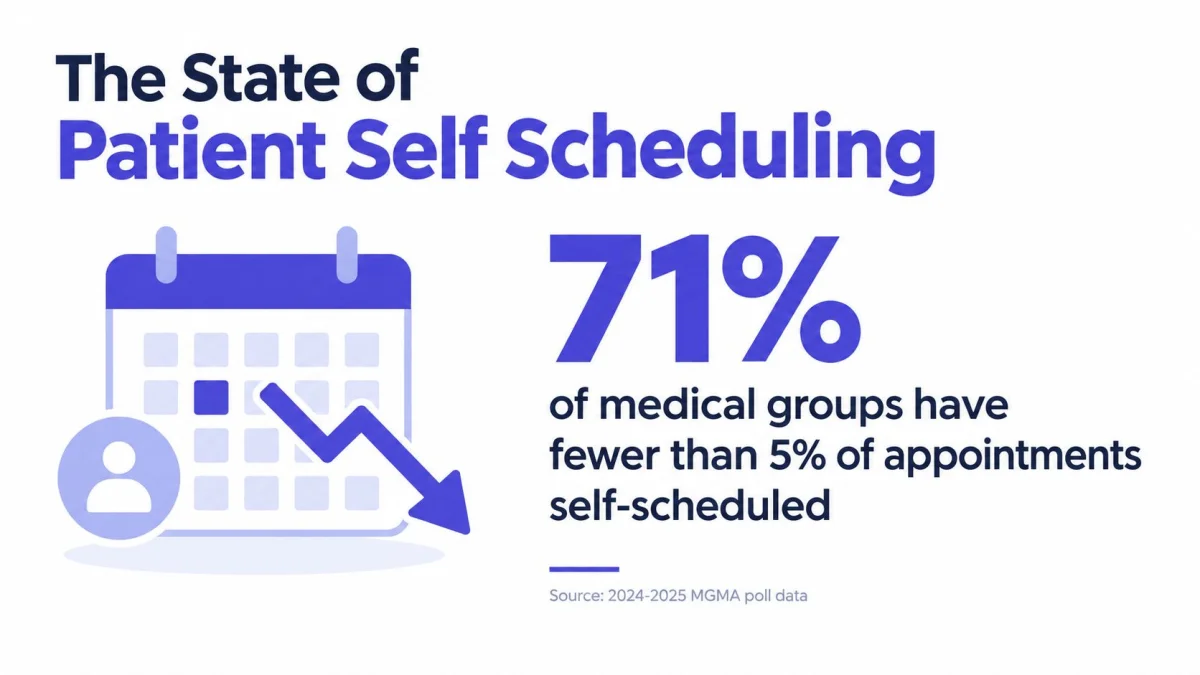
Self-scheduling is still far from universal. In a July 2025 MGMA poll, 71% of medical groups said fewer than one in four patients used digital scheduling tools, and only 3% said more than three quarters of patients self-scheduled (MGMA poll summary). That gap is the whole story, patient self scheduling works when the workflow is disciplined, but it fails fast when practices treat it like a calendar widget instead of an operational system.
The State of Patient Self Scheduling
The first signal is adoption, and it is still low in most medical groups. That gap matters because patient self scheduling only helps when enough patients use it. A clinic should care less about the idea and more about whether the workflow cuts front-desk work instead of creating new cleanup.
The no-show promise is only half true
The common sales pitch says self scheduling reduces missed visits. The better reading is more practical. A multicenter before-after study reported no-show rates falling from 25% to 11% and waiting time dropping from 38.2 minutes to 23.8 minutes after online appointment scheduling was introduced (MGMA evidence summary). Other studies are less dramatic. A Johns Hopkins analysis found 2.7% no-shows for self-scheduled appointments versus 4.6% for staff-scheduled appointments, while a web-based primary-care study found 3.07% versus 4.12%, and the difference was not statistically significant (JAMIA and related analysis).
The bigger operational point is that self scheduling can shift the problem instead of solving it. A published self-scheduling case study on cancellations showed 59.6% kept appointments, 2.7% missed appointments, and 37.6% cancellations. That tells you the core issue is slot release, reminder timing, and eligibility logic. If cancellation handling is sloppy, open time still leaks out of the schedule.
Practical rule: if booking is easy but cancellation handling is weak, capacity still gets lost.
Access is uneven, and that matters
Adoption is not equal across patient groups. In one imaging study, Latinx, Black or African American, and non-English-speaking patients were less likely to self-schedule than other active portal users (JAMIA study). That does not argue against self scheduling. It means clinics have to account for language, portal access, and digital comfort rather than assume the tool will solve access on its own.
For small US and UK practices, the vendor and pricing check is simple. Confirm whether pricing is per provider, per location, or tied to message volume. Ask how cancellations are handled, what happens when a patient books the wrong visit type, whether the system supports waitlist fill-ins, and how quickly staff can override a bad booking. If the booking flow adds admin work, skip it.
The right takeaway is blunt. Patient self scheduling works only when the practice treats it as an access strategy, not a software feature. A shallow workflow makes the schedule noisier. A disciplined one improves patient choice without turning the front desk into a cleanup team.
Designing a Workflow That Works
Patient self scheduling fails when clinics open the gates before the rules are set. Start narrow. Decide who can book, what they can book, and how far ahead they can book before a patient ever sees the calendar.
Access should be limited on purpose
Do not make every slot public. Routine follow-ups, established-patient visits, and clearly defined return appointments are the safest place to start. Complex consults and procedures belong behind staff review, where they can be screened before they hit the schedule.
The entry point matters too. Patients can book through the website, the portal, or a patient-facing flow that feeds the same calendar. The channel is less important than the rule set. If patients have to guess which path applies, the front desk absorbs the cleanup.
Timing should match the visit type
Booking windows need a reason. Short windows work when demand is steady and visit types rarely change. Longer windows help when patients need more planning time or when the practice wants more control over provider capacity.
A simple operating rule helps here: set the booking horizon based on how often the clinic changes schedules. If providers move time blocks often, shorter windows reduce reschedules. If the schedule stays stable, a wider window can improve access without adding friction.
Rules should be visible, not hidden
Rules are where many self scheduling projects break. The system has to handle provider preferences, payer limits, and visit-specific logic without forcing patients or staff to guess. Loose rules let the wrong appointment through. Rigid rules drive abandonment.
Check the workflow against real cases. A patient with an unusual insurance plan, a referral requirement, or a visit that depends on a prior test should still be able to move through booking without a manual rescue. If the path falls apart in those cases, simplify the rule set before launch.
For a cleaner setup pattern, map the workflow against automated booking tool features and keep the logic as simple as possible. Use workflow automation guidance for healthcare to remove handoffs, not add more of them.
For small US and UK practices, the vendor and pricing check should be blunt. Confirm whether pricing is per provider, per location, or tied to message volume. Ask how cancellations are handled, what happens when a patient books the wrong visit type, whether the system supports waitlist fill-ins, and how quickly staff can override a bad booking. If the flow creates more admin work, drop it.
A schedule that looks flexible on paper but creates front-desk exceptions all day is not flexible. It is underdesigned.
Solving the Documentation Bottleneck
Self scheduling creates a problem when documentation still moves through the old bottleneck. Patients book on their own and still arrive with incomplete details, while clinicians finish notes after hours. That is where the admin savings disappear.
The note has to move as fast as the appointment
A small practice needs documentation that keeps pace with the visit itself. PatientNotes is an AI medical scribe for individual clinicians and small practices, built by a company based in London, UK. It records the consultation, transcribes it with speaker separation, and writes a structured clinical note to the clinician's chosen template. It also works in the clinician's own language, which helps keep note quality consistent across different users and visit types.
A solo clinician can use that setup in a plain way. The appointment happens, the consultation is recorded, and the note comes back in the template the clinician already uses. That reduces the scramble after the visit and keeps the schedule from turning into a documentation backlog.

Intake and charting should support each other
Booking and documentation should run from the same structured intake flow. A clean schedule with a messy note still costs staff time.
A patient-facing booking path should feed the documentation process, not sit beside it. A structured intake form keeps intake consistent before the visit starts: patient intake form template.
The goal is simple, get the visit into the schedule and the note into the chart without making the clinician retype the same story twice.
Choosing the Right EHR Integration Path
A practice can lose more time to the wrong integration choice than to the scheduling tool itself. Native integration looks clean on a slide, but copy and paste is often the better operational choice for a small team because it is faster to set up and easier to maintain.
Native integration is not always the smart first move
The core point is simple, the note has to move into the record without making staff become data entry clerks.
PatientNotes offers a native integration with Semble, and every other EHR works through copy and paste. That split is deliberate, a native connection where it pays off, copy and paste everywhere else. For a small practice, the clipboard-based path often wins because it avoids a long implementation cycle and still gets the note into the chart.
EHR integration in plain English explains the basic tradeoff clearly, and it matches what clinics see in practice. The point is not technical elegance. The point is moving the note into the record without forcing staff to retype the same content.
Compare integration by workflow, not by hype
Use a native connection when the practice works in one system all day and needs tight operational coupling. Use copy and paste when speed, simplicity, and fewer moving parts matter more. Small teams usually care more about uptime and low friction than about engineering purity.
For a practical shortlist, review the EHR options for small practices and compare them against your real workflow. That is the right lens, because the best setup is the one the front desk and the clinician will keep using.
A few product facts make the choice clearer. PatientNotes includes a native iOS app with offline recording, specialty templates for 37 specialties, an AI template builder, and ICD-10, CPT, and CDT code suggestions for US billing only. Those features matter because they cut down the number of places where the workflow can break.
Vendor and Pricing Checklist
Small practices should use a hard checklist here, not a sales pitch. Start with pricing transparency, then check compliance, mobility, and support. If a vendor is vague on any of those, expect surprise costs and workflow gaps later.
What to check before signing
- Pricing clarity: Ask whether pricing is per user or bundled into a larger enterprise tier. Small practices need seat costs they can predict.
- Trial terms: The trial should let staff test the booking and documentation flow before anyone commits.
- Refund policy: A money-back guarantee lowers the risk of a bad fit.
- Compliance: HIPAA compliance and a BAA are required for US practices.
- Mobile reliability: A native phone app matters when visits happen outside a desktop workflow.
- Template coverage: Specialty templates save time only if they match the way the clinician documents.
- Support model: A small clinic needs direct help, not a long queue and a sales gate.
Measured against that checklist, PatientNotes covers the transparency, trial, refund and compliance items directly. It costs $70 per user per month billed monthly or $50 per user per month billed annually. It includes a 7-day free trial with no credit card, a 14-day money-back guarantee, HIPAA compliance, and a BAA at no extra cost. There is no enterprise tier and no sales call, which makes the evaluation process straightforward (PatientNotes pricing).
The useful question is whether the product removes work from the day, regardless of how advanced the vendor sounds. PatientNotes does that with team roles at the standard per-seat price, a native iOS app with offline recording, and copy-and-paste compatibility with any EHR that is not Semble.
For clinics that want a second point of reference, the alternative to Microsoft Bookings article helps separate clean setups from cluttered ones.
Getting Started with Implementation
The rollout should be boring. That is the point. Start with the smallest workable version, train the staff, and only then widen access.
A simple rollout sequence
- Set the booking rules first. Decide which visit types are open, which are staff-only, and how far ahead patients can book.
- Build the note template next. Make sure the documentation flow matches the visit types that will be scheduled.
- Turn on patient-facing access in one channel. Use one path first, then expand only after the team sees what breaks.
- Train front desk staff on exceptions. They need to know how to redirect edge cases without fighting the system.
- Write a short patient FAQ. Patients need plain language about who can book, when they can cancel, and what happens after they book.
- Review the first weeks closely. Look for wrong visit types, missed confirmations, and any pattern of cancellations that needs rule changes.
Keep the launch small enough to control
A phased rollout works better than a full switch. The clinic should let one visit type or one provider group go live first, then expand after the team understands the failure points. That keeps trust intact.
The same discipline applies to documentation. If the note workflow is easy on day one, the staff will keep using it. If it creates cleanup work, the practice will fall back into old habits. A simple implementation beats a clever one that nobody trusts.
Conclusion and Key Takeaways
Patient self scheduling only works when the clinic accepts the tradeoff. It can reduce missed visits, but it can also push problems into cancellations if the rules are loose. The MGMA adoption data cited earlier shows strong patient interest and weak real-world uptake, so this is an operations decision, not a software shopping exercise.
Start small, keep the booking rules tight, and make sure documentation is built into the workflow before patients touch it. For a small US or UK practice, the checklist is simple: clear visit types, straightforward cancellation rules, one clean integration path, and pricing that is easy to explain without hidden setup work.
If the front desk spends more time fixing exceptions after launch than before, the problem is the rule set, not the software. In that case, tighten the workflow before you open more appointment types.