Most clinicians know the feeling. The day ends, the waiting room is quiet, and the chart still isn't done. The note that started as a quick record has turned into a pile of copied text, stale problem lists, and a plan that takes too long to find.
A good template for progress notes should do the opposite. It should make the next visit easier to understand, keep the active assessment visible, and help the clinician close the chart without dragging yesterday's clutter into today's care. That matters because progress notes were originally treated as a snapshot of what happened, not a full chart archive, and the continuity purpose is still the same today, to capture what changed, what was found, and what happens next, tied to the encounter itself (AAFP).
The Real Cost of Poor Progress Note Templates
A bad note template wastes time twice. First, it slows the person writing the note. Then it slows the person who has to read it, whether that's the same clinician at the next visit, a covering colleague, or a coder trying to confirm what happened.
The problem is usually not the absence of structure. It's too much structure in the wrong places. When a template tries to preserve every historic detail, the note stops behaving like a progress note and starts behaving like a warehouse. The result is more noise, not more clarity.
A large cross-sectional study of nearly 3 million outpatient progress notes across 46 specialties showed how serious this gets. Median note length rose 60.1%, from 401 words in 2009 to 642 words in 2018, and median redundancy increased 10.9 percentage points, from 47.9% to 58.8% (JAMA Network Open). That is not just administrative bloat. It makes it harder to see the current assessment and the actual change since the last encounter.
What a template should protect
A useful progress note template protects three things at once, continuity, readability, and follow-through. It should preserve the clinical story without turning every encounter into a recap of the entire chart. It should also make the active plan easy to scan, because the plan is where the next action lives.
Practical rule: if the note takes longer to read than the visit took to complete, the template is probably carrying too much history.
Templates also matter because progress-note ecosystems can become fragmented quickly. One outpatient study found templates were used in 89% of 2.5 million visits across 52 specialties, but the median was only 2 templates per visit, and just 17% of 100,230 unique templates were ever used by more than one person (PMC). That kind of sprawl makes governance hard. It also means many clinicians are editing around template problems instead of documenting care.
A better template for progress notes is not a static form. It is a narrow, reusable frame that forces the clinician to answer the same practical questions every time, what changed, what was found, what was decided, and what happens next.
Core Fields Every Progress Note Template Needs
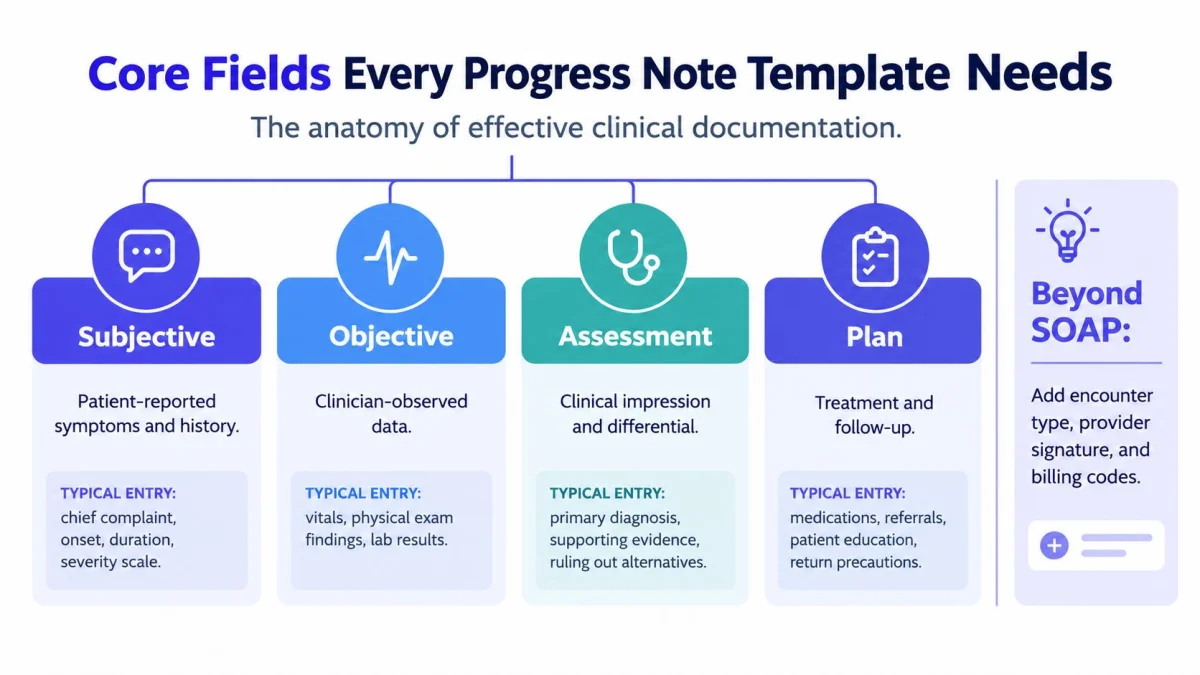
A lean note is easier to defend, easier to hand off, and easier to bill from. The core structure still starts with SOAP, but the value is in how each section is populated, not in the heading itself. A strong template keeps the history concise, separates reported symptoms from observed findings, and reserves the most important real estate for decision-making.
Keep the note tied to the encounter
The Subjective section should capture what the patient said since the last visit, not a repeat of the entire history. Chief complaint, interval symptoms, onset, duration, severity, and relevant patient-reported change belong here. The Objective section should hold only what was observed, measured, or reviewed during the visit, such as exam findings or test results.
The Assessment should do the heavy lifting. It should state the clinical impression, include the differential when needed, and explain why the current diagnosis fits better than the alternatives. The Plan should show the next action clearly, medications, follow-up, education, referrals, and return precautions.
Keep the Assessment and Plan active. If those sections read like copied history, the note has already lost most of its value.
Add the fields that support compliance
Beyond SOAP, a practical template needs the encounter type, the provider signature, and billing codes where they apply. A template should not bury those items at the bottom of a wall of copied prose. They should be visible enough that the next reviewer can confirm the note is complete without searching.
For billing structure, the main point is not to turn the note into a coding worksheet. It is to support the medical decision-making already documented in the Assessment and Plan. That is where current CMS E&M thinking matters most, because the note should make the complexity of the visit legible, not inflate it with unnecessary detail. The AMA's late-2024 guidance also made clear that CMS does not prohibit templates, while warning that templates should be maintained routinely to reduce note bloat and unnecessary documentation (AMA).
A practical way to think about the fields is this:
- What changed since last visit, not the whole problem list.
- What was found today, not every historical exam element.
- What the clinician thinks is happening, with enough reasoning to show why.
- What happens next, in language the care team can use.
For a simple reference point outside clinical documentation, a download board minutes template can show how clean structure helps readers find decisions fast. The document type is different, but the same rule applies, the reader should not have to hunt for the action items.
Adapting Templates for Different Clinical Specialties
A single universal template looks tidy on paper and messy in practice. A clinician managing chronic disease needs different prompts from a therapist tracking mood response or a physical therapist tracking functional movement. A rigid form forces people to ignore fields they do not use, which is how template sprawl starts.
Specialty design should begin with the clinical workflow, not with a generic form. That means the template must reflect the questions each specialty asks during the visit. In cardiology, the interval history may need to emphasize symptom change and medication response. In behavioral health, mental status and risk-related prompts matter more. In orthopedics, range-of-motion and function often carry more weight than a broad narrative.
Match the template to the specialty
The best templates use the same base frame, then swap in specialty-specific prompts. That keeps documentation consistent enough for governance while letting each discipline capture the details that matter most. A primary care template might keep chronic disease follow-up concise. A mental health template may need a stronger narrative around response, side effects, and safety. A physical therapy template often benefits from structured functional notes rather than long free text.
The reason this matters is simple. If every clinician has to force their encounter into the same shape, the note becomes less useful for everyone. A shared baseline can still exist, but specialty prompts need room to breathe.
PatientNotes shows one version of that approach through its specialty library, which covers 37 specialties and includes specialty templates that can be selected before recording, with details on the available specialties listed at patientnotes.ai/specialties. That kind of library only works if the template is treated as a reusable clinical frame, not a fixed paper form recreated on a screen.
Use a baseline, then branch where needed
A good specialty library keeps the same backbone across the practice. That makes training easier and reduces confusion during cross-coverage. Then each specialty gets the sections it truly needs. A psychiatrist does not need the same prompt structure as a dentist. A dermatologist does not need the same flow as a pediatrician.
The challenge is not variety. It is control. Too many custom fields create a second kind of clutter, one that comes from overfitting the template to every edge case. The goal is not to make each template unique. The goal is to make each template accurate, fast to complete, and easy to review later.
Avoiding the Hidden Dangers of Copy-Forward Text
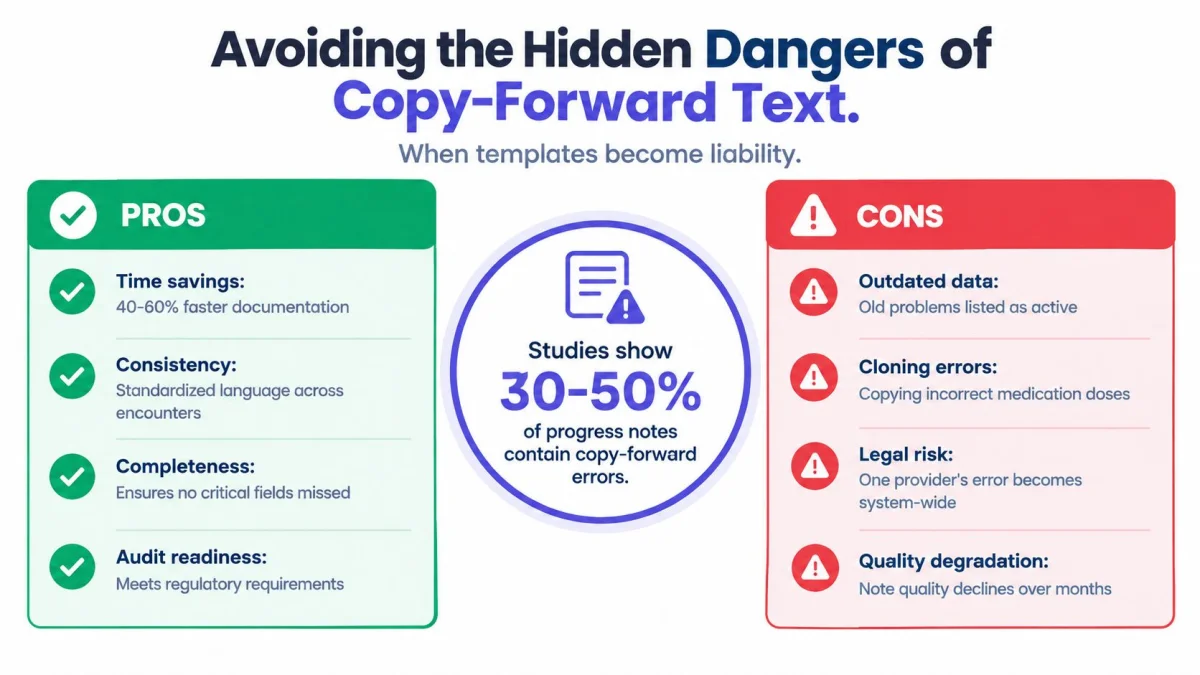
Copy-forward feels efficient until it starts carrying yesterday's error into today's note. That is the hidden cost of a bloated template. It lets outdated problems, incorrect medication doses, and resolved issues keep living in the chart long after they should have been cleared.
A study of electronic progress notes found an average note length of 886 words, 29% were signed after 4 PM, and 26% of reviewed notes had clinical risk associated with preserved content (PMC). Other evidence in the same source shows how copied and imported text can dominate note composition, with only 18% manually entered text versus 46% copied and 36% imported. In ICU progress notes, 92% contained a copy-paste-related error, with an average of 2.4 errors per note, concentrated in the Assessment and Plan (PMC).
Design the template to force active updates
The safest template for progress notes makes copying harder where it matters most. The Assessment and Plan should require fresh input every time. A note can reuse structure, but it should not auto-fill the clinical thinking that belongs to the current visit.
Outdated text is not just messy. It can become the working version of the chart if no one forces a correction.
That means templates should avoid prepopulating whole prior narratives. They can carry forward stable data when appropriate, but active sections need prompts that ask for change, response, and next steps. If a problem resolved, the template should make that easy to state. If a medication changed, the template should make the new dose visible and the old dose easy to overwrite.
Keep the note short enough to review
Long notes are not automatically better notes. Once the important information gets buried, the template has crossed the line from support tool to liability. A concise note protects the reader, especially when multiple clinicians share the chart.
The core design goal is simple. Every note should answer, in plain language, what changed since the last visit and what the clinician wants done next. Anything that does not help answer that question belongs under scrutiny.
Building and Maintaining Templates with AI Scribes
Traditional EHR builders often punish small edits. A prompt change turns into a support ticket. A specialty tweak gets delayed. A workflow fix never quite makes it into production, so staff keep working around the same old template.
A newer approach is to build templates from actual clinical material, then keep them editable by the people who use them. AI template builders can turn a sample note, a dictation, or even a pasted document into a reusable structure. Freed's resource page says users can upload or paste a sample note and generate a learned template, and template tools can also turn prompts or uploaded patient information into structured notes. That same basic mechanic is visible in the way modern note products draft from source material into reusable forms.
Build the template from real encounters
Templates built from real notes are usually cleaner than templates built from abstract preference lists. They reflect how the practice documents, not how someone imagines it should document. That matters for specialties with specific language patterns and repeatable follow-up structures.
A practical workflow is simple. Start with a strong sample note, extract the sections that recur, and strip out the text that only belongs to a single visit. Then use that structure as the baseline template. If a specialty needs a different flow, build that as a separate version rather than burying it inside one oversized master template.
Use the note workflow that fits the chart
A copy-and-paste workflow still works when the EHR does not offer deep native integration. Tali's help center says it supports traditional copy-and-paste with all EHR products, and Spruce also says information can be transferred to any EHR via formatted copy and paste. That is enough for many small practices, because the clinician can draft the note, review it, and move it into the chart field without waiting on a complex integration project.
PatientNotes uses that basic pattern for most charts, with Semble as its only direct EHR integration and copy-and-paste for the rest. It also supports an AI template builder, session archive, notes in the clinician's own language, and a native iOS app with offline recording. The product's template and workflow details are described at patientnotes.ai/resources/best-ai-scribes.
The value here is not automation for its own sake. It is template maintenance that happens fast enough to keep up with the practice. When the template can be refreshed without IT overhead, it is more likely to stay lean.
A useful comparison point for teams evaluating workflow shape is Tutorial AI vs Scribe, especially for practices trying to understand where template generation ends and note drafting begins.
Your Template Audit and Deployment Checklist
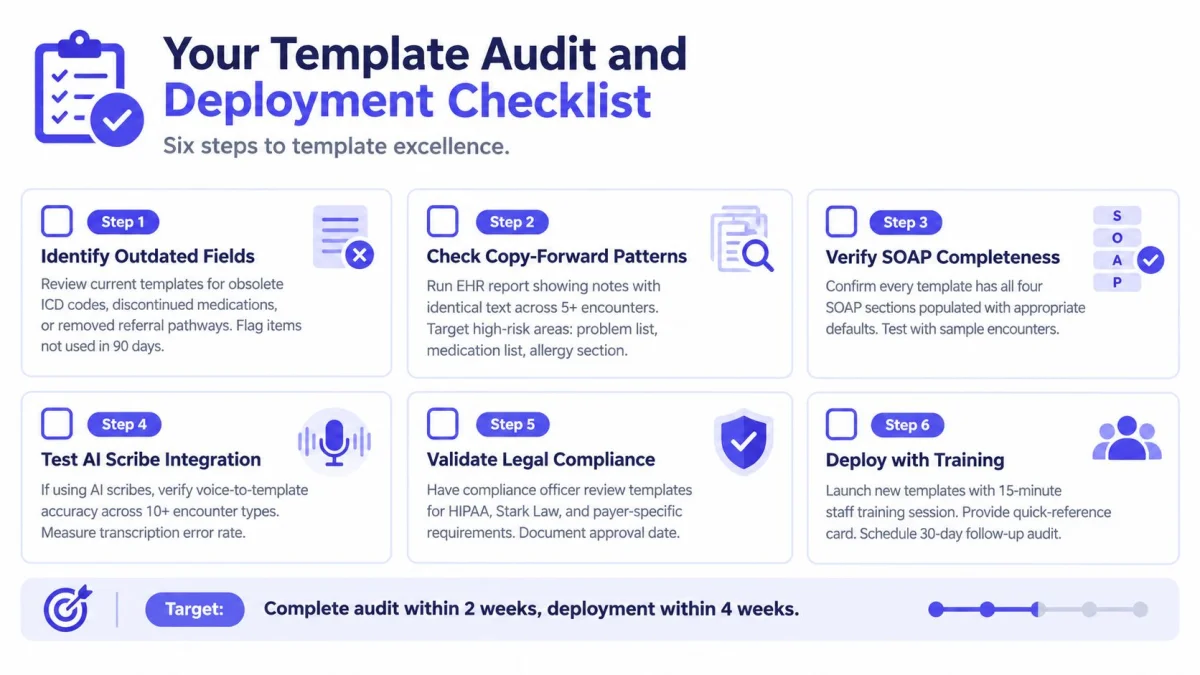
Start with the templates already in use. The fastest way to improve documentation is usually to remove what no longer belongs. Obsolete fields, stale prompts, and repeated sections are easier to fix than a brand-new build from scratch.
Run a small audit first
A useful audit starts with the obvious problems. Look for outdated fields, copied medication lists that haven't changed in months, and templates that still reflect old referral paths or removed workflow steps. Then check for copy-forward patterns by reviewing notes that repeat the same text across multiple encounters.
The next pass is structural. Confirm that every template has a complete SOAP flow and that the Assessment and Plan still require active input. If AI drafting is part of the workflow, test voice-to-template accuracy across a handful of encounter types before wider rollout. For teams that want a more formal structure, the internal documentation audit checklist can help organize the review.
Governance rule: if no one owns the template, the template will drift.
Roll out slowly, then train hard
Deployment works best in small steps. Start with a small group of providers, confirm that the revised template is readable and fast, then expand only after the first group is comfortable. Training should be short and specific. People need to know what changed, where to find the active sections, and what not to copy forward.
For teams tightening documentation workflows, a workflow standardization guide can be useful for planning the rollout sequence and naming ownership clearly. The point is not to add bureaucracy. It is to keep the note format stable enough that clinicians do not need to relearn it every month.
A modern template for progress notes should help the clinic write less, not more, while keeping the clinical logic visible. PatientNotes is built around that idea, with specialty templates, AI template building, copy-and-paste EHR support, and progress-note drafting for small practices that want cleaner documentation without a sales process. Visit PatientNotes to review the current pricing, template options, and workflow fit for your clinic.