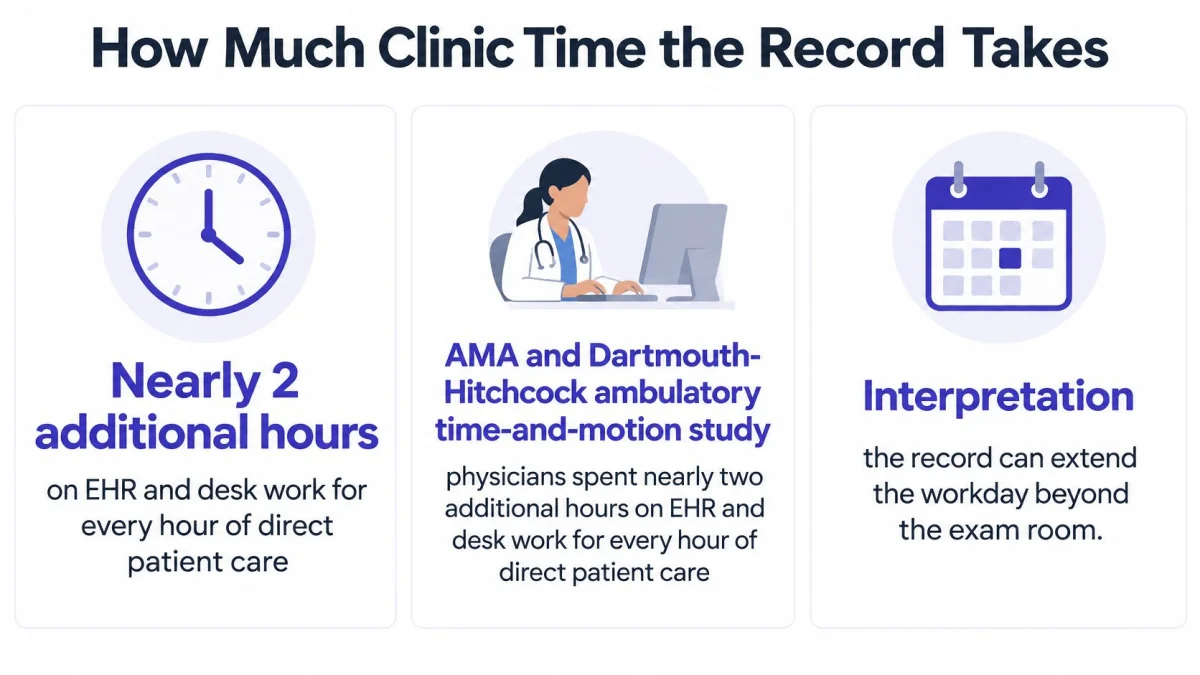
Physicians spent nearly two additional hours on EHR and desk work for every hour of direct face-to-face patient care in the American Medical Association and Dartmouth-Hitchcock ambulatory time-and-motion study. That's the core of EHR pros and cons for a small practice. The record is easier to find and read. The clinician still pays for that gain in minutes, attention, and evenings.
What EHR Pros and Cons Mean Now
Say a solo clinician finishes the last visit, closes the exam room door, and still faces an inbox, three unfinished notes, and a result that arrived in a format that can't be filed cleanly. The chart is complete enough for billing. The day isn't finished. That gap, between a better file and a harder visit, is where EHR pros and cons should be judged now.
Adoption isn't the open question it once was. In 2024, 95.0% of U.S. office-based physicians had adopted an electronic health record, while 83.6% used a certified EHR, according to the U.S. Centers for Disease Control and Prevention (CDC) National Center for Health Statistics. Paper is largely gone from that setting, so a paper comparison doesn't help a practice decide what to do next.
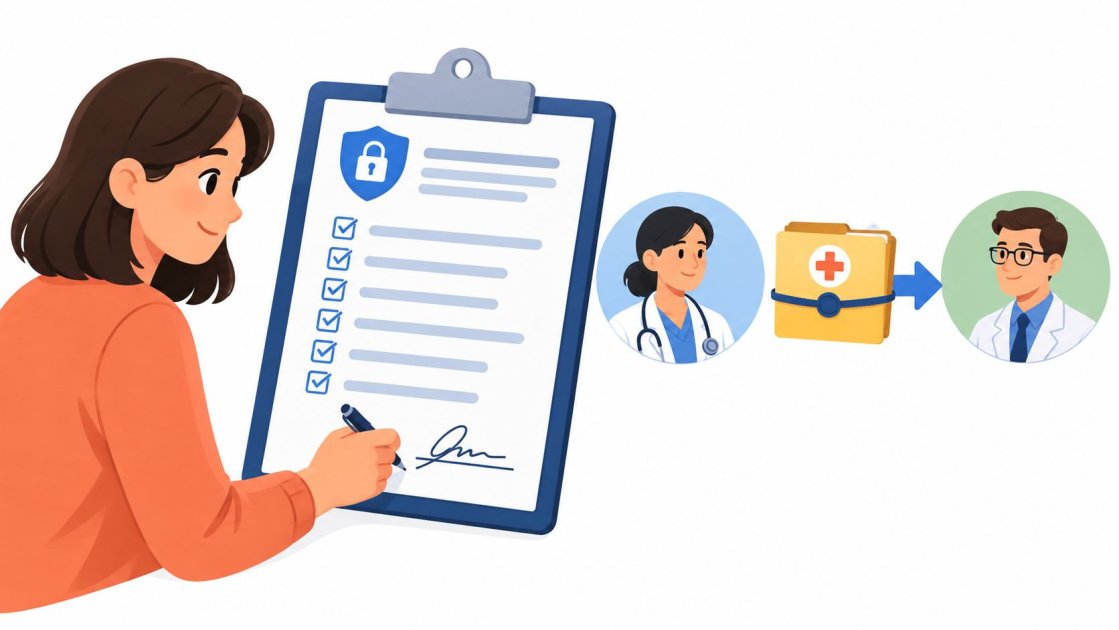
An EHR is the legal system of record for history, medications, orders, results, and billing. A documentation aid is different. It drafts a note that the clinician reviews and edits before anything enters that record. Confusing those two roles causes bad buying decisions and unsafe shortcuts.
Who This Decision Affects
The reader here is an individual clinician or a small clinic in the United States or the United Kingdom. That includes primary care and specialty care. It also includes mental health, dentistry, and allied health, where the note, the letter, or the treatment record often carries the whole episode of care.
Five tests run through the rest of the discussion. Count clinician minutes. Count errors caught and errors created. Check whether another clinician can act on the data without extra work. Check privacy controls. Then count total cost, not the monthly license alone.
The useful comparison is rarely digital against paper. It's this EHR against a better-configured version of itself. Sometimes it's this EHR against the same EHR plus a lighter documentation layer beside it. A scan table comes first, then time, safety, data movement, three clinic days, and a keep, fix, or add decision.
Advantages and Drawbacks Side by Side
Use the last column as a scorecard for the system already in place. Don't score features in the abstract. Score what happened during the last normal clinic week.
EHR advantages and drawbacks by decision criterion
| Criterion | Typical advantage | Typical drawback | What to measure |
|---|---|---|---|
| Record access | Readable chart on site and remotely | Attention shifts from patient to screen | Share of the visit spent in the record |
| Documentation | Templates, search, and legible notes | Charting runs past the visit and into the evening | Minutes per visit and after-hours charting |
| Safety | Structured meds, prompts, and fewer illegible orders | Display, alert, and wrong-chart errors | Wrong-patient orders, overrides, missed tasks |
| Interoperability | Information can leave the building | Often view-only, so staff retype it | Re-entry of labs, referrals, and outside notes |
| Cost | Less paper handling and clearer billing fields | License, training, conversion, and lost visits | Total cost, not the monthly license alone |
| Privacy | Access control and an audit trail | More copies, portals, and vendor access | BAA, encryption, export rights, and logs |
| Workflow | Inbox, orders, and measures in one system | Clerical work follows the clinician home | After-hours inbox and order time |
Record access is a real gain. A readable chart can be opened in clinic, at home, or during a remote consult. The same screen can pull eye contact away while the patient is describing the problem. Access helps only when the clinician isn't hunting through it during the conversation.
Documentation beats illegible paper in obvious ways. Templates prompt for missing parts, search finds an old result, and structured fields support coding. Yet the chart often outlasts the appointment. A note that looks complete at midnight may still represent a failed workflow.
Safety, Sharing, and Cost Need Pairs
Safety also cuts both ways. Structured medication lists and prompts can support safer, more consistent work. Poor display, confusing alerts, and the wrong chart open at the wrong moment create new error paths. A practice shouldn't claim a safety gain unless it also tracks the failures the system makes possible.
Interoperability is the row most often oversold. Sending a record is not the same as letting the next clinician update it, reconcile it, or act on it. View-only access can leave a small practice printing, scanning, or retyping information that was technically shared.
Cost starts with the license, then continues. Training hours, data conversion, support, downtime, and paid clinician time all belong in the total. Privacy has a similar split. Access control and audit logs are strengths, while every extra portal, export, and vendor relationship creates another copy and another access path to govern.
Workflow explains why these rows collide. Inbox messages, orders, results, referrals, and quality fields live in one place. That consolidation is convenient during clinic. It's also why unfinished clerical work can follow the clinician home.
An EHR can improve the file and still worsen the visit.
Pick the two rows that caused pain this week. Read those later sections first and measure those rows before changing software.
How Much Clinic Time the Record Takes
For a small practice, time spent charting has a direct cost: a clinician absorbs the extra work, or the schedule gets shorter.
Ambulatory EHR time from published studies
| Study | Who was measured | Main time finding | Where the time went |
|---|---|---|---|
| AMA and Dartmouth-Hitchcock time-motion study | Ambulatory physicians | Nearly 2 hours of EHR and desk work per 1 hour of face-to-face care | Desk work during clinic and after hours |
| Massachusetts General and Brigham primary care | 307 primary-care physicians in 31 practices | 36.2 minutes in the EHR per visit versus a visit of about 30 minutes; middle 50 percent 28.9 to 45.7 minutes, according to the study of EHR time among primary-care physicians | Whole-visit EHR interaction |
| Ambulatory event-log study | Physicians in scheduled clinic | More than 5 hours in the EHR per 8 hours scheduled | Documentation 33 percent, inbox 13 percent, orders 12 percent |
What the Split Means
Electronic records make information available, legible, searchable, and easier to exchange in structured form. A clinician can find a medication list without calling for a folder, review a result away from the building, or use structured data for orders, billing, and quality reporting.
Time shifts toward clerical work when the interface demands fields that do not affect care, inbox tasks lack a clear owner, or staff must copy information between systems. The record stays open, while the clinician's attention moves between screens and tasks.
That burden can contribute to frustration, after-hours work, reduced attention, and burnout. For a small practice, the staffing risk is direct: a clinician who charts every night may reduce sessions, leave, or stop taking complex patients, even if the software license looks affordable.
Primary care often involves preventive prompts, chronic disease fields, referrals, medication reviews, messages, and results across many problems. Specialists may face a different mix, but every small office has the same basic constraint: unpaid screen time falls to a short list of people.
Three Local Measures
Published averages cannot diagnose a local clinic. Track the same pattern for two ordinary weeks:
- Minutes in the record per visit: Count time before, during, and after the encounter, not just typing time.
- Minutes after the last patient: Separate same-day completion from work done at home.
- Share by task: Split time among note writing, inbox activity, orders, results, and billing corrections.
The split shows whether the main burden is note writing, inbox work, or the broader setup. A documentation tool may reduce note time while refills, result routing, and prior authorization messages still fill the day. Once the local pattern is clear, this guide to charting for doctors can help frame ways to address documentation.
In the cited event-log study, documentation was about one third of EHR time, so fixing the note alone does not fix the day.
Use these local measures as a baseline for changes. If a template adjustment, inbox rule, or documentation tool does not shift one of the three counts, it has not solved the problem the practice identified.
Safety Gains and Usability Failures
Safer than paper is too simple. An EHR can prevent one kind of error and create another in the same workflow. Each gain needs a matching failure mode and a metric that would reveal trouble early.
The recurring usability problems are poor information display, complicated navigation, excessive screen sequences, and mismatch between system workflow and clinical workflow, identified in the Pew summary of a US Agency for Healthcare Research and Quality review and MedStar Health analysis. In that MedStar Health analysis, researchers identified 557 safety incidents associated with EHR usability. 14% were judged potentially capable of causing temporary patient harm, 1% potentially contributing to permanent harm, and the incidents may have contributed to two deaths.
Those findings don't erase the safety case for electronic records. In a study of 209 US primary-care practices, 92 using EHRs and 117 using paper records, EHR practices had significantly higher adoption of safety-promoting workflows, policies, and practices across all measured domains, including medication management, according to the peer-reviewed comparison of EHR and paper primary-care practices. The benefit is strongest when structured medication reconciliation, guideline prompts, decision support, and standardized documentation are built into work, rather than free text being digitized.
Pair Every Gain With a Check
- Medication reconciliation: Track completion, then audit missed or stale reconciliations.
- Alerts and prompts: Track actions taken and the alert override rate.
- Chart access: Track faster retrieval, then count wrong-chart corrections.
- Task lists: Track completed follow-ups, then review overdue tasks every week.
Dosing errors, missed diagnoses, treatment delays, duplicate documentation, and incorrect orders can hide inside polished screens. A monthly review doesn't need a quality department. One clinician can review documentation time, screens or clicks per encounter, after-hours charting, alert overrides, wrong-chart corrections, and task completion.
Ambient capture and configurable templates may reduce typing and navigation. They don't remove the safety duty. Transcription accuracy, speaker attribution, clinical relevance, and clinician sign-off remain essential before generated content enters the legal record.
Keep decision support that changes a medication, a test, or a follow-up. Question alerts and required fields that staff override every day. Any alert rule a practice adopts should trace to a cited primary source, such as a peer-reviewed study or the relevant specialty guideline, not to a vendor default.
When Shared Records Still Cannot Be Used
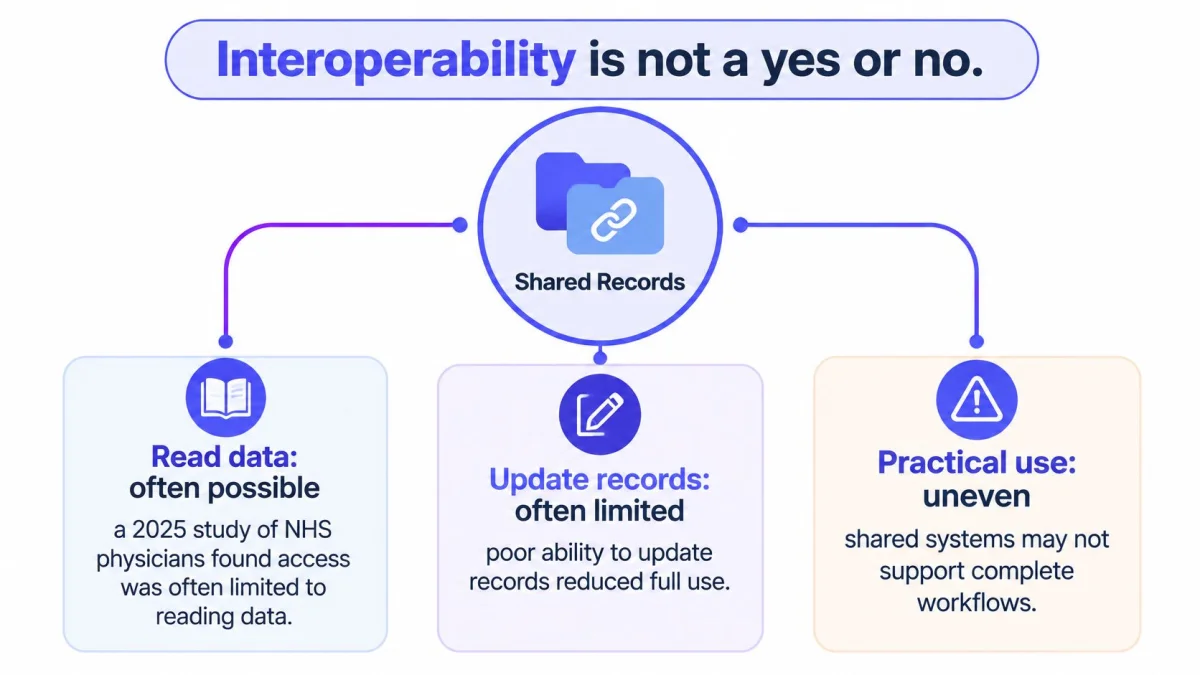
Interoperability isn't a yes or no question. A system can receive data and still prevent the receiving clinician from editing, reconciling, or acting on it. That distinction matters more than an integration checkbox on a sales page.
A 2025 study of physicians in the NHS found interoperability was often limited to reading data, with poor ability to update records across organizational boundaries, in the peer-reviewed NHS interoperability study. Participants reported longer consultations and hospital stays, repeat investigations, impaired communication, and perceived patient-safety risks. Reading another organization's record gave context. It didn't always let the clinician complete the next step inside that shared information.
This concept map separates reading access from the ability to update and use a record.
Technical Exchange Is Not Workflow Use
Primary care, hospital, laboratory, imaging, pharmacy, and behavioral health systems often use different products or data models. A small US practice may receive a continuity document or portal file that can't be reconciled into active medication and problem lists. A UK clinician may view hospital information but still write the local plan somewhere else. The exchange succeeded. The workflow didn't.
Sharing helps when the receiver can understand the condition and use the information in a personal plan. Timely, structured, trustworthy data can be more useful than a larger pile of records. Volume alone can slow a visit when the clinician must decide which medication list is current or whether a result has already been acted on.
Can the next clinician act on this without retyping it, switching context, or pasting it?
That question exposes the hidden bill. Count it for one month before blaming staff for slow referrals or repeat tests.
- Duplicate documentation: Outside notes rewritten into the local chart.
- Delayed referrals: Referrals waiting for records to be located or converted.
- Repeated tests: Tests ordered again because prior results couldn't be trusted or filed.
- Search and validation time: Minutes spent hunting, comparing dates, and confirming outside information.
A small practice can't force a hospital, laboratory, or payer to replace its system. That's why a lightweight tool that works across existing records solves a different problem from buying another EHR. It can reduce manual transfer around the encounter. It doesn't create a universal interface, and it doesn't remove clinician review before text enters the legal record.
Judge interoperability at the point of use. If outside data creates re-entry, it belongs on the drawback side of EHR pros and cons, even when the connection itself works.
Privacy and Total Cost
Privacy and cost need the same discipline as clinic time. A polished demo can hide both. A small practice should score them before signing, migrating data, or connecting another tool.
Start with access. Ask who can see patient data, how accounts are limited by role, and whether audit logs show viewing, editing, export, and deletion. Ask how data is encrypted, when backups are tested, and how access ends when a staff member leaves. Don't accept a general promise of security in place of those answers.
In the US, confirm the vendor's business associate agreement before patient data moves. The practical guide to HIPAA BAA requirements helps frame what to request, but the signed agreement and the vendor's stated controls still need review. Ask for the BAA, data export rights, subcontractor handling, breach notification duties, and access to audit logs in writing.
UK practices need the equivalent local check for their setting and contracts. Confirm data protection responsibilities, retention, export, subprocessors, and any NHS-linked assurance duties that apply to the service being provided. Don't assume a US compliance label answers a UK question, or the reverse.
Count Copies and Count the Whole Year
Every portal, export, interface, backup, and vendor creates another place where record data may sit. Count those copies. Name an owner for each one. Remove accounts and exports that no longer serve care, billing, or a legal duty.
- BAA and contracts: Signed before use, with export and deletion terms understood.
- Access control: Named users, role limits, and prompt removal for leavers.
- Audit logs: Available to the practice, not held only by the vendor.
- Data copies: Portals, downloads, interfaces, and support access listed.
Cost needs a one-year view. Add the license, implementation, data conversion, training hours, paid time during training, support, interface fees, and visits lost during go-live. Label estimates as estimates and keep invoices separate from guesses. Clinician minutes belong in the model because unpaid evening work is still a cost to retention.
The rule for any new tool is plain. It must pass the same privacy test as the EHR before it touches patient data. A low subscription price doesn't offset weak export rights or unclear vendor access.
Three Small Practice Days Compared
Clinic size changes which trade-off hurts first. The scenes below each keep one gain, one break, and one sensible response. They use local minute counts rather than borrowing a published average as if it described every office.
This workflow image sets up the contrast between record work that supports a visit and record work that competes with it.
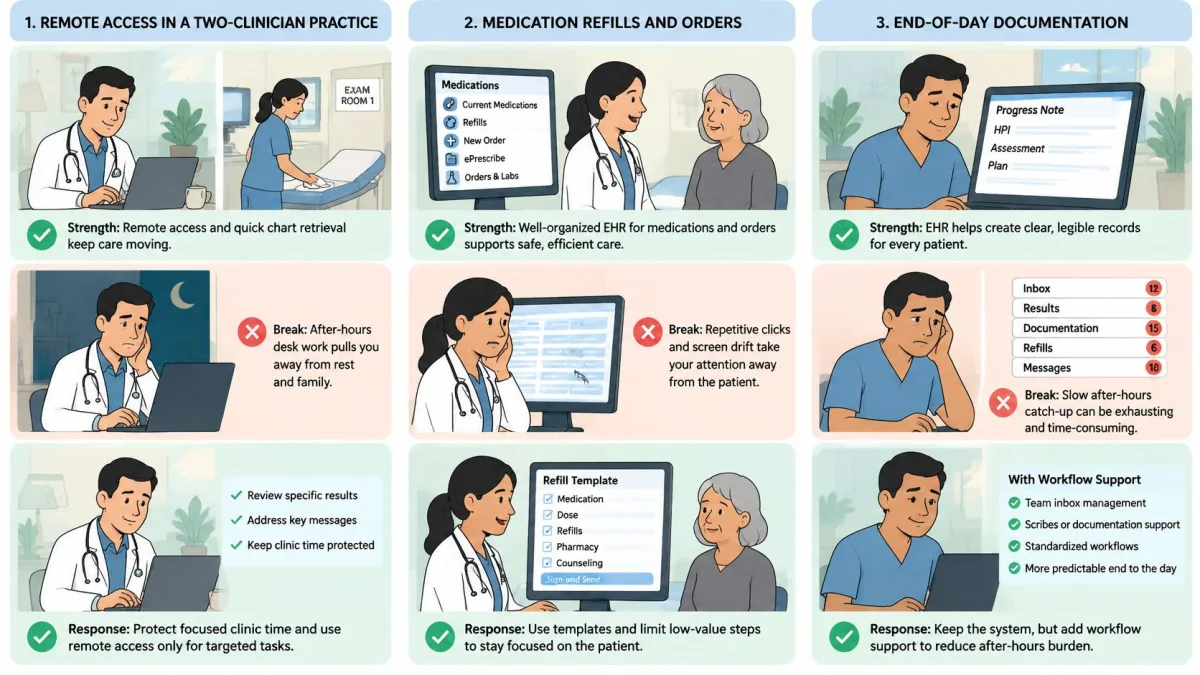
A Two-Clinician US Family Practice
Remote access helps between visits. The physician checks a result from home, reads a clear medication list, and sends instructions without waiting for a paper chart. That access supports continuity when the other clinician covers.
The break appears after supper. The practice counts its own record time around visits and finds unfinished inbox work waiting most nights. Refills, results, forms, and note corrections compete in the same queue. The license fee isn't the main cost. Unscheduled clinician attention is.
The response starts inside the current system. Cut required fields that don't change care or payment. Batch refill and result work into defined sessions with a named owner. Then recount evening minutes before deciding whether note drafting is the remaining bottleneck.
A UK Clinician With Read-Only Hospital Access
Hospital context arrives before the consultation. The clinician can see recent investigations and correspondence, which makes the opening conversation better informed. That's a meaningful gain over waiting for a letter.
The visit still grows longer. The hospital record can't be updated from the local workflow, a test may be repeated because the prior result can't be filed cleanly, and a summary gets pasted into the local note. The clinician has information, but not a shared working record.
Track re-entry, delayed referrals, and repeated tests for a month. Don't assume buying a different local EHR will connect the hospital. The response may be a clearer local filing rule, a shorter transfer template, and pressure on the actual interface that creates the duplicate work.
The short video below gives a visual pause between the UK scene and the solo specialty scene.
A Solo Psychiatrist, Dentist, or Physiotherapist
A consistent template helps when the note is the product of the visit. It supports the treatment plan, the letter, the claim, or later review by the patient and another clinician. Searchable prior notes also make follow-up less dependent on memory.
The break is fit. A general-practice EHR may force irrelevant screens, while a specialty workflow may need sections the product never designed. The clinician clicks past fields that don't describe the encounter, then writes the actual assessment in free text anyway.
Use a template that matches the visit and keep one rule fixed. The clinician reviews every note before it becomes final. Across all three scenes, implementation quality changes the outcome. Training, configuration, and ownership can make the same product save time in one office and create friction in another. The practice closest to one of these days should turn next to the keep, fix, or supplement decision.
Decide to Keep Fix or Supplement the EHR
An EHR can organize the record while making the consultation harder to manage. Decide what to keep, fix, or supplement by asking two questions: does the system save clinician time, and can another clinician act on the information it stores?
Use this checklist to match the change to the problem.
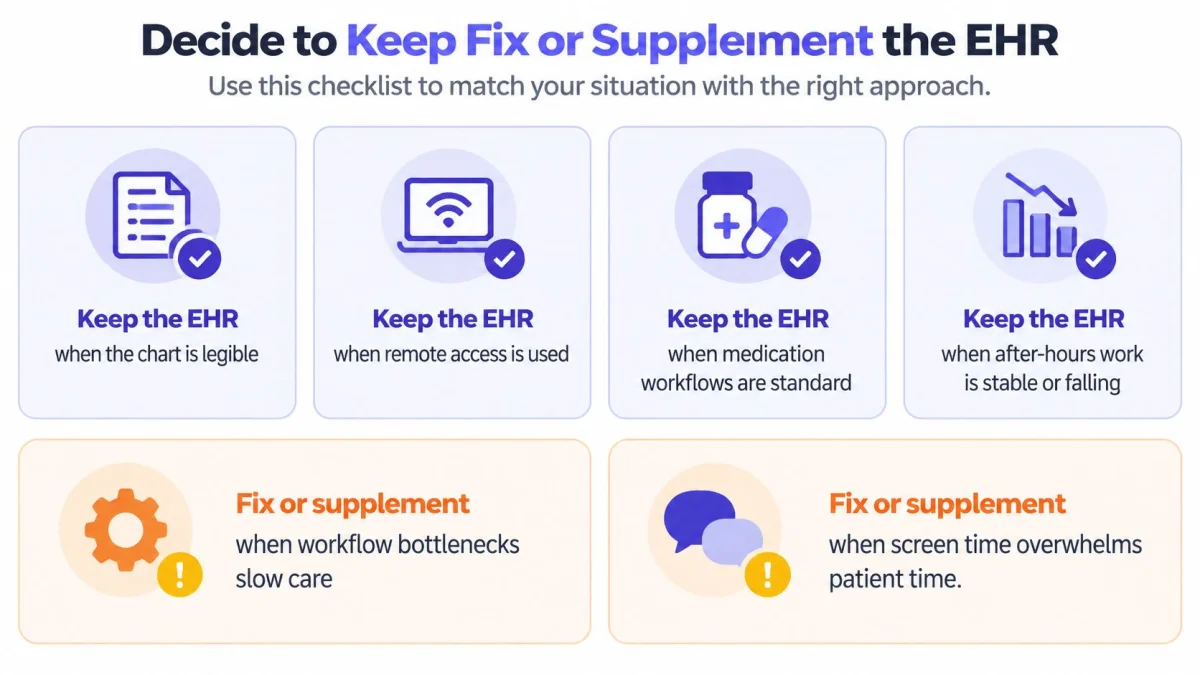
Keep the EHR when the chart is legible, remote access is useful, medication workflows are standard, and after-hours work is stable or falling. Fix its setup when the main problems are clicks, alert overrides, required fields, or inbox design. Supplement it when orders, results, and billing need to stay in the EHR, but note writing takes up the evening and deep hospital integration is unavailable.
A replacement can cost more than the license. The 2025 ethics analysis of EHRs, iPatients, and clinician well-being reports that EHRs can hold more information than clinicians can use, contributing to information overload, workflow friction, and potential medical-error risks. It also reports that the 2025 U.S. Primary Care Scorecard found primary-care clinicians spend more time on EHR work than clinicians in other specialties. Implementation costs for full-featured systems can range from roughly $32,000 to $70,000 per full-time employee, as reported in the 2025 ethics analysis of EHRs, iPatients, and clinician well-being. A 2025 systematic review found generally positive effects on workflow, communication, quality, and safety, alongside technical problems, integration difficulties, increased workload, implementation costs, inadequate training, and unclear direct effects on patient outcomes.
Where a Documentation Layer Fits
PatientNotes fits the supplement path. It is an AI medical scribe, not an EHR, built by a London-based company for individual clinicians and small practices. The pricing page lists $70 per user per month billed monthly or $50 per user per month billed annually, with a 7-day free trial requiring no credit card and a 14-day money-back guarantee. Its Enterprise plan is custom priced for larger practices and health systems. Prospects can book a demo with PatientNotes' customer success team. The specialties page describes its specialty templates, the compare page provides product comparisons, and the resources library contains guides.
PatientNotes records consultations in person, by phone, or by telehealth, then transcribes them and drafts a structured note in the clinician's chosen template and language. A native iOS app records offline. Templates cover 37 specialties, and an AI template builder can create templates from a dictation, chat, or uploaded document. The service is HIPAA compliant with a BAA included at no extra cost. ICD-10, CPT, and CDT suggestions apply to US billing and require clinician review. Semble is the only EHR integration; for other EHRs, notes transfer by copy and paste. Clinicians review and edit each note before finalizing it. The guide to medical scribe requirements explains how documentation assistance differs from owning the medical record.
Close the decision with four measures: time per visit, after-hours minutes, re-entry rate, and wrong-chart corrections. If charting time dominates, trial a documentation layer and track whether those minutes fall. If re-entry or wrong-chart corrections dominate, address the EHR workflow first.
If evening charting is the main burden, PatientNotes offers a 7-day free trial with no credit card, HIPAA compliance with a BAA included, and clinician-reviewed notes that can be copied into the existing record. Measure time per visit and after-hours minutes during the trial. Keep the added layer only if those measures improve.