Choosing an EMR for small practices on monthly price alone leaves out the costs that actually break a small budget. Setup hours, training, lost visits, interface fees and after-hours charting decide whether a system pays back. A solo clinician or a two to ten person clinic needs a shorter, harder checklist than a hospital does, because there's no IT department to absorb a bad fit and no spare clinician to cover a slow week.
Why Small Practices Need a Different EMR Checklist
Owning an EMR is no longer the hard part. The Office of the National Coordinator quickstats on office-based physician EHR adoption puts U.S. office-based EHR adoption at 95% in 2024, up from 21% in 2004, with certified EHR adoption at 91% in 2024. A practice can run a certified system and still lose an hour a night finishing notes in it.
Daily use is where small practices stall. Reviews of small primary-care practices name costs, limited knowledge of EHR functionality, and difficulty changing office operations as the barriers to meaningful use, along with disruption during upgrades and trouble with performance tracking and quality measurement. The gap is workflow, not digitization.
Say a solo family physician already has an EMR. Scheduling and billing work. The notes don't. Every visit ends with fields that don't match the way the visit ran, so charting spills into the evening. Replacing the whole system to fix one part of the day is expensive and disruptive. Keeping it and fixing documentation is usually the cheaper move, and the checklist should test that first. A small-practice checklist has to separate those two options before any demo.
What This Guide Compares
The comparison covers full EMRs and the documentation tools that sit alongside them, scored on total cost, usability, templates, integrations, mobile and offline use, and interoperability, with a separate contract and security check. PatientNotes is in the second group. It is an AI medical scribe that records a consultation, writes a structured note to a chosen template, extracts follow-up tasks, and works alongside an EHR by copy and paste. It is not a full EMR, it doesn't replace scheduling, prescribing or billing, and it's scored here on the same criteria, including where it doesn't fit.
The sections run in the order a buyer works through the decision: a scoring framework first, then total cost of adoption, usability and template fit, integrations and mobile access, contracts and security, and verdicts by practice type with a trial plan. Readers are mainly U.S. clinicians, with UK clinicians covered where coding or contract rules differ.

The Seven-Factor Scoring Framework for Small Practices
Score every option on the same seven rows before any demo, so a polished presentation can't move the goalposts. If a tool can't do a row at all, it scores low on that row. Skip the row and the gap disappears; score it and the gap shows up in the total where it belongs.
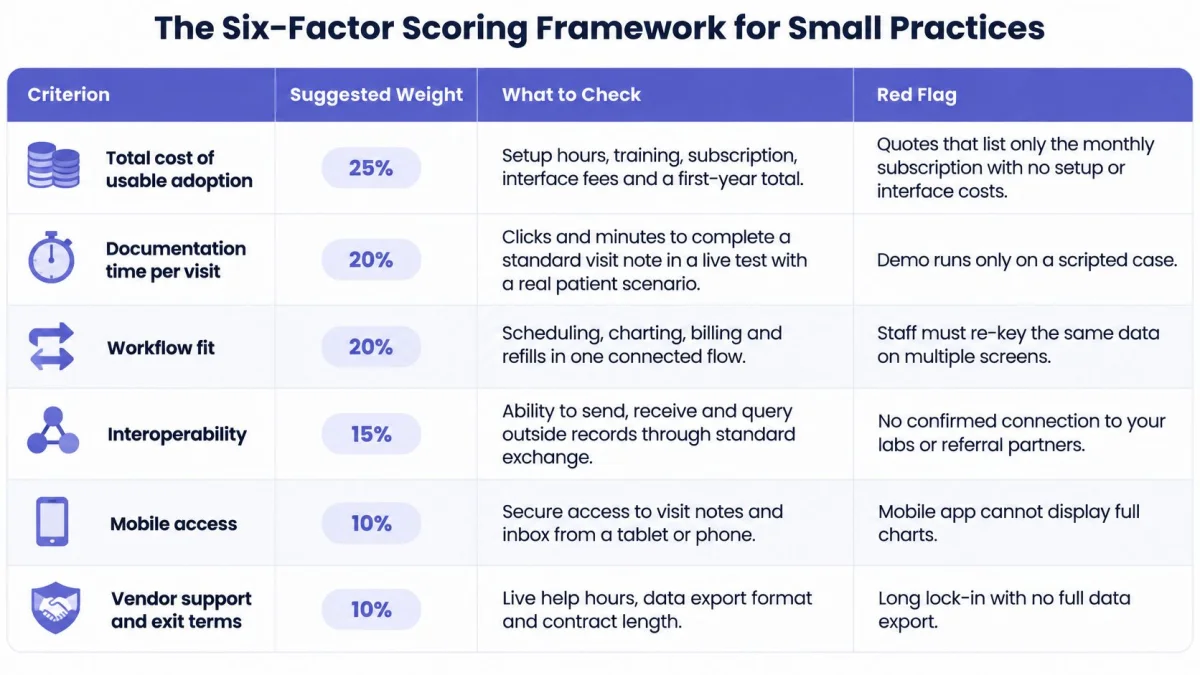
| Criterion | Suggested weight | What to check | Red flag |
|---|---|---|---|
| Total cost of usable adoption | 25% | Setup hours, training, subscription, interface fees and first-year total | Price quoted without setup or interface costs |
| Usability | 20% | Clicks to finish a typical note and minutes to first note in a live test | Training needed beyond one session |
| Templates and specialty fit | 15% | Your exact note formats, editable by your practice | Fixed forms only, no editing |
| Integrations | 10% | Named connections to your EHR, billing or labs, in writing | Vague promise with no written scope |
| Mobile and offline use | 10% | Recording with weak signal, screen locked, and sync afterward | Works on desktop only |
| Interoperability and export | 10% | Structured export and clean copy-paste into any EMR | Locked export format |
| Contract and security | 10% | BAA, audit logs, role-based access, backups and breach process | No BAA, or BAA sold as an extra |
How to Run the Score
Score each row 1 to 5, multiply by the weight, and add the points for a total out of 500. Score usability and mobile use from a hands-on trial, not a vendor demo. A demo runs on a scripted case with clean data. A trial runs on a real clinic day, which is where clicks and failed syncs show up.
The weights are my recommended starting point, not a fixed standard. Cost and usability carry the largest shares for a practical reason: setup hours, training and interface fees are where small-practice budgets tend to break, and clicks per note repeat on every patient of every clinic day. Adjust the percentages before scoring, not after. A solo clinician on a tight budget can raise total cost to 35% and take the points from integrations. A specialty group whose notes follow a strict format can raise templates instead. What shouldn't move is the red-flag column: a red flag caps that row at 2, whatever the salesperson says.
Pass-fail gate: No signed BAA means no patient data in the tool, whatever the total score says.
A Worked Example
One hypothetical option scores 4 on total cost, 3 on usability, 5 on templates, 4 on integrations, 3 on mobile and offline use, 4 on interoperability and export, and 5 on contract and security. The points run 100 + 60 + 75 + 40 + 30 + 40 + 50 = 395 of 500. That total is usable for ranking, but the contract score only counts once the BAA is signed. Until then the deal is stopped, whatever the arithmetic says.
Total Cost of Usable Adoption, Not Just the Monthly Fee
The subscription is usually the smallest line in year one. The Agency for Healthcare Research and Quality study of 26 primary-care practices estimated that a typical five-physician practice needed 611 hours for planning and implementation plus 134 hours per physician for chart preparation, training and workflow redesign; total cost reached $233,297 from the four-month planning period through the first year, or $46,659 per physician, while productivity ran about 8% lower in the first six months and about 4% below pre-EHR levels after 12 months.
The split matters more than the headline. Most of the spend sat in planning, personnel and operating expenses rather than equipment. A vendor quote that lists only a per-seat fee is describing roughly a third of the actual spend. The rest is staff time, and in a small practice staff time is clinician time.
Productivity is the second hidden line. For a practice booked out weeks ahead, an 8% dip means fewer completed visits and less collected revenue during rollout. Budget for lighter schedules, slower templated notes and some after-hours charting while templates settle, or the dip arrives as a cash-flow surprise.
Year-One Cost Worksheet
| Cost component | Benchmark | How to estimate for your practice |
|---|---|---|
| Implementation labor | 611 hours for a five-physician practice | Hours multiplied by staff hourly cost |
| Clinician training and chart preparation | 134 hours per physician | Hours multiplied by clinician hourly cost |
| Subscription | Per-seat monthly rate quoted in writing | Users multiplied by 12 and by the monthly rate |
| Productivity dip | About 8% lower in first six months, about 4% below baseline at 12 months | Monthly visits multiplied by the lost share, then by revenue per visit |
| Ongoing support | Recurring vendor support after the first year | Vendor support quote |
| Interface and integration fees | Connection-specific charges when quoted | Written quote for each connection |
| Switching cost | Set by export format and migration scope | Export test and migration hours |
Newer estimates land in the same range. The 2025 primary care scorecard from the Milbank Memorial Fund puts a full EHR at $32,000 to $70,000 per full-time employee, varying with deployment model and implementation support. Anyone comparing a full EMR replacement against keeping the current system should also read the breakdown of medical practice startup and operating costs, since rent, staffing and billing costs compete for the same cash.
The Break-Even Check
Run one calculation before signing anything. PatientNotes costs $50 per user per month billed annually, which is $600 per year, or $70 per user per month billed monthly, which is $840 per year, as listed on PatientNotes pricing. A 7-day free trial with no credit card gives enough room to time real notes before annual billing.
At a clinician time value of $60 an hour, saving about 10 hours a year covers the $600 annual price. Saving 15 minutes a week across 46 working weeks clears it. The same math applied to a $46,659 per physician EMR rollout needs roughly 778 hours saved per physician to break even in year one. Ask every vendor for implementation, interface and training fees in writing, multiply hours saved per week by weeks worked, and compare the result with the full adoption cost.
Usability and Template Fit for Solo and Small Teams
The 2025 primary care scorecard reports that nearly half of family physicians rate EHR usability as poor or fair and more than one-quarter are dissatisfied with their system. In a solo or two-person practice, poor usability has nowhere to hide. It lands on the same clinician every day, and the hours it costs arrive after the last patient leaves, which is why template fit belongs inside any honest adoption-cost calculation.
Usability becomes concrete at the template level. Three approaches show up in most evaluations, and they behave very differently on a real note.
Three Template Approaches Compared
- Built-in fixed forms: Fast to deploy and consistent across users. The cost shows up when a specialty note doesn't match the form. Clinicians type around fields, leave required boxes with placeholder text, or keep a second note elsewhere. Consistency on paper, workarounds in practice.
- Specialty template library: A head start rather than a blank page. PatientNotes offers templates across 37 specialties, including family medicine, internal medicine, psychiatry, dermatology, orthopedics and pediatrics. A library only helps if the starting template is close. Editing ten fields is fine. Rebuilding the note is not.
- Template builder: A dictation, a chat or an uploaded document becomes a new template. PatientNotes includes an AI template builder that works this way. The output still needs clinician review before use, because a builder reproduces whatever structure it was given, including a bad one.
One Note, Two Specialties
Take a dermatology biopsy note and a psychiatric intake. The biopsy note needs lesion site, size, morphology, procedure detail and specimen handling. The intake needs history, mental status, risk assessment and a formulation. A single generic form serves one of them badly.
Whichever specialty loses will route around the template within a month, and that workaround becomes the hidden subscription fee: retyped fields, parallel documents, notes finished at home.
Score fit with a simple test. Take one real, de-identified note from your own practice. Run it through each approach. Count the fields deleted, added or retyped. That count predicts daily friction better than any feature list, and each field you fix by hand is a few minutes of charting returned to your evening.
A template is a starting point, not a standard. Check it against your own note standard and the specialty society guidance that applies to your work, and read that guidance at its source.
Language is part of fit too. Notes and tasks come out in the clinician's own language in PatientNotes, which matters for UK clinicians and for bilingual practices where the consultation and the record don't always share a language. A tool that forces one output language adds a translation step to every note.
Integrations, Interoperability and Mobile Access
Small practices exchange data less well than large ones, and the gap is structural. In 2019 data reported in a peer-reviewed analysis of physician interoperability by practice size, only 44% of solo-practice physicians could electronically send, receive or query outside clinical information, compared with 71% in practices of 4 to 10 clinicians and 76% in practices with more than 50 clinicians.
Integration into the record is weaker still. Only 17% of solo practitioners could integrate outside information directly into the EMR, versus 30% in 4 to 10 physician practices and 51% in practices larger than 50 physicians. Across all physicians, 65% could send, receive or query external information, but only 29% could integrate it. For readers weighing how systems connect in plain terms, Finchum Fixes IT explains systems integration in language aimed at small organizations without an IT staff.
What That Means for Buying
Don't assume deep, vendor-specific interoperability will appear after purchase. Small-practice tools should preserve clinician control over where documentation lands and support structured export or clean copy and paste into any EMR. Certification and a connectivity logo don't prove that a note arrives formatted, matched to the right patient, and recoverable after a failed sync.
PatientNotes' position is narrow and stated plainly. Semble is the only EHR integration. Every other EHR works by copy and paste. There is no Chrome extension. A practice that needs native, bidirectional exchange with a hospital system should treat that as a disqualifier rather than a roadmap item. Details on phone-based capture are covered in the guide to choosing a medical recording app.

Mobile and Offline Reality
The native iOS app records offline and keeps recording with the screen locked. That covers a basement clinic room, a home visit with weak signal, or dictation in a car park between sites. Recording that stops when a screen locks or a signal drops isn't a minor bug for a mobile clinician. It loses the consultation.
Four Tests Before Buying
- Transfer one note into the current EHR and confirm headings, lists and tasks survive intact.
- Check patient matching using a common name, so a near-duplicate record can't swallow the note.
- Reconcile one outside record against the chart and confirm a human decides what merges.
- Simulate a failed sync by recording offline, then confirm the note uploads complete once signal returns.
Copy and paste is the integration for most EHRs, so test the paste, not the promise.
HIPAA Contracts and Security Checks Before Patient Data
A solo practice has the same HIPAA duties as a larger clinic. The U.S. Department of Health and Human Services guidance on business associates states that a covered entity must have a written business associate agreement before a cloud service creates, receives, maintains or transmits electronic protected health information, and that using a cloud provider without a BAA can place the practice in violation of the HIPAA Rules.
HHS security guidance material for providers adds that the written contract must meet 45 CFR 164.504(e). The practice does not have to supervise every safeguard method the vendor uses, while the written protections still apply. A small admin team has less time for oversight, and the obligation stays the same. A fuller walkthrough sits in the HIPAA BAA requirements guide, and practices building a broader security program can compare against published healthcare security compliance requirements before writing their own policy.
Shared Responsibility, Stated Plainly
A BAA shares responsibility between the vendor and the practice. A business associate can be directly liable for certain HIPAA obligations, while the practice still answers patient requests for access to records in a designated record set. The agreement should say how the vendor makes information available and how it supports amendments and an accounting of disclosures. If the vendor cannot produce records the practice is legally required to produce, the contract has failed at its main job.
PatientNotes states that it is HIPAA compliant with a BAA included at no extra cost. Use that as the starting point, then review the security controls. Ask any vendor to put its security controls, audit log access and breach process in writing. Controls that are not written down cannot be checked later.
The Pre-Use Sign-Off
- Signed BAA in hand before any real patient data enters the tool.
- Multifactor authentication enforced on every account, including the owner account.
- Role-based access so staff see only the records their job requires.
- Tested backups, with a restore performed, not just scheduled.
- Written downtime workflow covering how notes get captured when the system is unavailable.
- Named breach contact at the vendor and at the practice.
- Tested export route so records can leave the system in a usable format.
UK practices should confirm requirements with their data protection officer and check current rules at primary sources such as NHS England or the Information Commissioner's Office. UK clinical record rules should come from primary sources rather than a vendor page or a U.S. focused guide.
Which Setup Fits Your Practice and How to Test It
The right setup depends on what the practice already runs and where the hours go. A clinic whose records system works but whose evenings disappear into charting has a different problem from a clinic with no system at all, and the table below prices that difference.
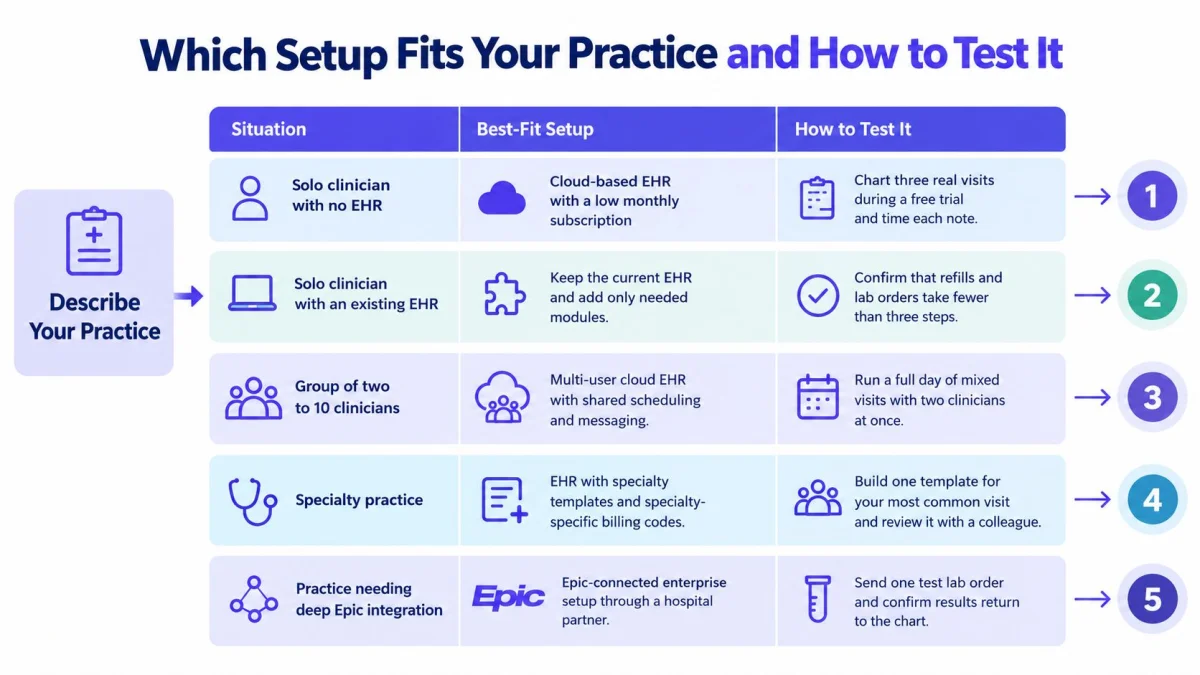
| Situation | What matters most | Setup that fits | Verdict |
|---|---|---|---|
| Solo clinician, no EHR yet | Total cost and simple setup | Lightweight EMR plus a documentation tool | Good fit for notes; pick the EMR on its own merits |
| Solo clinician, existing EHR | Less charting time without replacing the EHR | Keep the EHR and paste notes into it | Good fit; finished notes paste into any EHR |
| Group of 2 to 10 clinicians | Per-seat cost, shared templates and roles | Shared templates with team roles | Good fit at per-seat pricing; confirm roles in writing |
| Specialty practice | Templates that match the note format | Specialty library with editable templates | Good fit where the specialty sits in the template library |
| Practice needing deep Epic integration | Native EHR-level integration | Health system vendor EHR | Not a fit |
| US practice billing insurers | Coding support | Coding tools with human review | ICD-10, CPT and CDT suggestions for clinician review |
| UK practice | Notes and tasks in the clinician's language | Documentation tool plus existing EHR | Good fit for notes; code suggestions do not apply |
The coding limit needs no softening. ICD-10, CPT and CDT code suggestions apply to US billing only, and they're suggestions for clinician review, not submitted codes. Those code sets belong to the CDC and National Center for Health Statistics for ICD-10-CM, the American Medical Association for CPT, and the American Dental Association for CDT. UK practices gain nothing from that feature and shouldn't pay for a tool on its strength. The same honesty applies at the other end: a practice that needs deep Epic integration needs a different category of vendor entirely.
A short product walkthrough shows the recording and note flow before any account exists.
The Seven-Day Trial Plan
- Start the trial at the pricing page. The 7-day free trial needs no credit card, which removes the usual excuse for testing with fake data only.
- Confirm the BAA before any real patient data is used. No signature, no patients.
- Pick one real clinic day with at least 10 consultations and two late notes carried over, because late notes are the problem being tested.
- Record three consultations on the iOS app, including one with weak signal, to test offline capture and locked-screen recording.
- Select or build one template and edit the output against a note written the usual way, counting changed fields.
- Paste a finished note into the current EHR and check formatting, task extraction and patient instructions.
- Time every note against the current baseline in minutes, then run the break-even calculation with real numbers.
- Decide by day 7. A purchase that doesn't fit is covered by a 14-day money-back guarantee, but a decision made on timed evidence rarely needs it.
The PatientNotes resources library sets out the product's scope and template coverage, which is worth reading before the trial week starts so the seven days go to testing rather than orientation.
PatientNotes records consultations on web or iOS, writes structured notes to specialty templates, extracts follow-up tasks, and pastes cleanly into an existing EHR, at $50 per user per month billed annually with a BAA included. For a small practice whose EMR works but whose evenings don't, that fixes the expensive part without a system replacement. Start the 7-day free trial with no credit card at PatientNotes and time the first clinic day against the current baseline.