Most advice about HIPAA compliant AI note taking stops at two checks: the vendor signs a business associate agreement, and the data is encrypted. Run both, the advice implies, and the documentation problem is solved.
It isn't. A signed BAA is a contract about who carries which duty. It doesn't tell you what to do when a draft note lists a medication the patient said they stopped, doesn't establish that anyone asked the patient before the microphone went on, and doesn't stop a clinician signing a fluent paragraph nobody read.
The pressure behind the search is real. The American Medical Association's physician comparison data found 48.2% of physicians reported at least one symptom of burnout in 2023, down from 53.0% in 2022, while 44.2% said organizational culture or policy prevented them from delegating documentation work and 30.4% said their EHR wasn't built to support it. Delegation is the lever. Compliance is the brake that keeps it safe.
HIPAA Requirements for AI Note Taking at a Glance
A HIPAA compliant AI note-taking tool needs seven controls in place before it records a patient: a signed business associate agreement, encryption in transit and at rest, audit logs, unique logins with role-based access, a written retention and deletion rule, a defined incident response process, and a full list of subcontractors that touch PHI. Most come from the HIPAA Security Rule's administrative, physical and technical safeguards. The BAA comes from the business associate rules.
"Hipaa compliant" is a claim the vendor makes. What makes it true in your practice is your own risk analysis, your access rules and your review habits. Treat the table below as a starting checklist, not legal advice.
Core HIPAA requirements and the question to ask each vendor
| Requirement | What it covers | Question to ask the vendor |
|---|---|---|
| Business associate agreement | Permitted uses, safeguards, incident reporting, subcontractors, return or destruction of PHI | Will you sign a BAA before any patient data is processed? |
| Encryption in transit | PHI moving from device to cloud to EHR | Which protocol and version protect uploads and syncing? |
| Encryption at rest | Stored recordings, transcripts, notes and backups | Are stored audio, transcripts and backups encrypted, and who controls the keys? |
| Audit logs | Record of access and system activity on PHI | Which events are logged, who can read the logs, and how long are they kept? |
| Access controls | Unique logins, role-based permissions, removal of former staff | Can each clinician have a unique login, and can an admin revoke access at once? |
| Incident response | Detection, reporting and documented handling of security incidents | How and how quickly will you notify me of a suspected breach? |
| Retention and deletion | How long audio, transcripts and notes are kept | Can I set a retention period and request deletion of recordings? |
| Subcontractors | Any AI model provider or cloud host that handles PHI | Which subcontractors handle PHI, and are they bound by written agreements? |
Read the contract with the HHS business associate guidance open beside it. The agreement must describe permitted and required uses and disclosures, prohibit uses outside it or applicable law, require appropriate safeguards, require reporting of security incidents, cover subcontractors, and address return or destruction of PHI when the relationship ends. A one-page PDF that says the vendor is compliant is not that document.
The rows that get skipped are the rows that bite. Access controls decide whether an audit log can identify a person at all. Retention decides how long a recording of a patient's voice sits on a server. Incident response decides who calls whom at 11pm on a Friday. None of those are covered by an encryption badge.
If you're building the wider picture, a guide to safe clinical AI adoption is worth an hour, and a separate walkthrough of HIPAA compliance for healthcare providers covers how the rules land on a small team with no compliance officer.
The next action is mechanical. Copy the third column into one email per vendor. Don't record a patient until every row has a written answer.
Why a BAA Is Necessary but Not Sufficient
The duty splits at the contract boundary. The vendor owns the controls inside its service. The practice owns the conditions around it: who may record, which patients are asked for consent, which workforce members can open transcripts, how long audio and notes are kept, and who reviews the draft before it becomes part of the record.
The clause list sits in the requirements table above. The point here is the gap around those clauses. A signed agreement gives the practice enforceable promises about the vendor's handling of PHI. It does not decide whether a clinician should hit record in this room, with this patient, on this device.
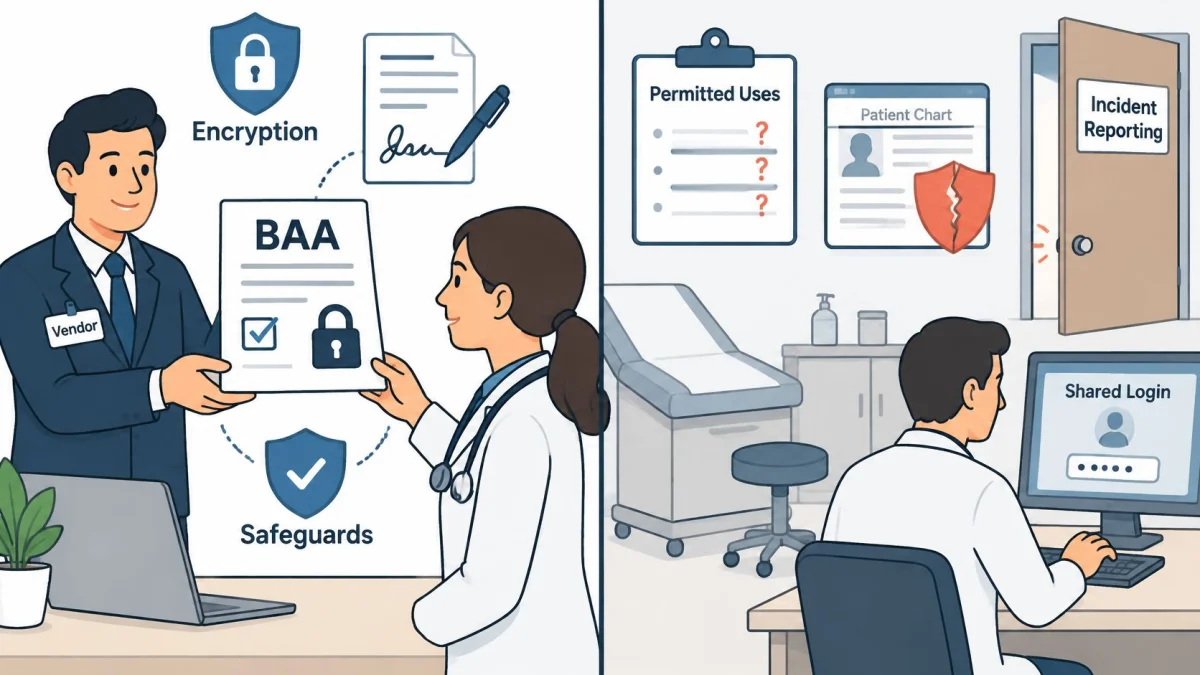
What the contract covers, and what it leaves to you
A vendor that refuses a BAA should not hear patient audio. Signing is the admission ticket. After that, the practice still has to run its side of the program.
Encryption does not settle the question either. HHS states that a cloud provider can be a business associate even when it cannot view the data because the information is encrypted and the provider holds no decryption key, and that the provider remains directly responsible for applicable HIPAA requirements (HHS cloud computing guidance). So “the vendor encrypts everything” answers one safeguard question and leaves the rest standing.
Practical rule: a BAA works like a lease. Your practice still has to lock its own doors and decide who holds the keys.
Read the allocation clause by clause and mark which promises land on the vendor and which land on you. A clause-by-clause read of HIPAA BAA requirements is the fastest way to see which side of that split a contract puts you on. Then write down the practice-side controls the contract cannot supply: role-based access, a consent script, a review step before signature, and a deletion rule someone follows.
Why the contract keeps mattering more, not less
The enforcement trend rewards practices that can produce evidence, not reassurances. HHS reported that from 2018 through 2023 large breaches rose by 102% and the number of individuals affected rose by 1,002%, with more than 167 million people affected by large breaches in 2023 alone, large breaches from hacking and ransomware up 89% and 102% since 2019, and 730 Office for Civil Rights compliance reviews initiated in 2024, including 663 triggered by breach reports involving unsecured PHI affecting 500 or more individuals (HHS compliance report to Congress).
Expect the same controls to keep getting tested: risk analysis, multifactor authentication, incident-response planning and anti-malware protection. For an AI note workflow, sign the BAA before any PHI is processed, then keep going. The contract starts the file. Your operating habits finish it.
Map the Data Lifecycle From Recording to Deletion
Compliance work that stays abstract never gets done. Draw the path instead: follow one recording from the patient's voice to the deleted file, and name a risk at every stop.
HHS requires covered entities to run an accurate and thorough assessment of risks to the confidentiality, integrity and availability of all electronic protected health information, including the data an ambient recording and transcription service creates, receives, maintains or transmits (HHS risk analysis guidance). For a scribe, that means the assessment has to reach the microphone, the model and the backup copy.
The stages below are the ones to check, in order.
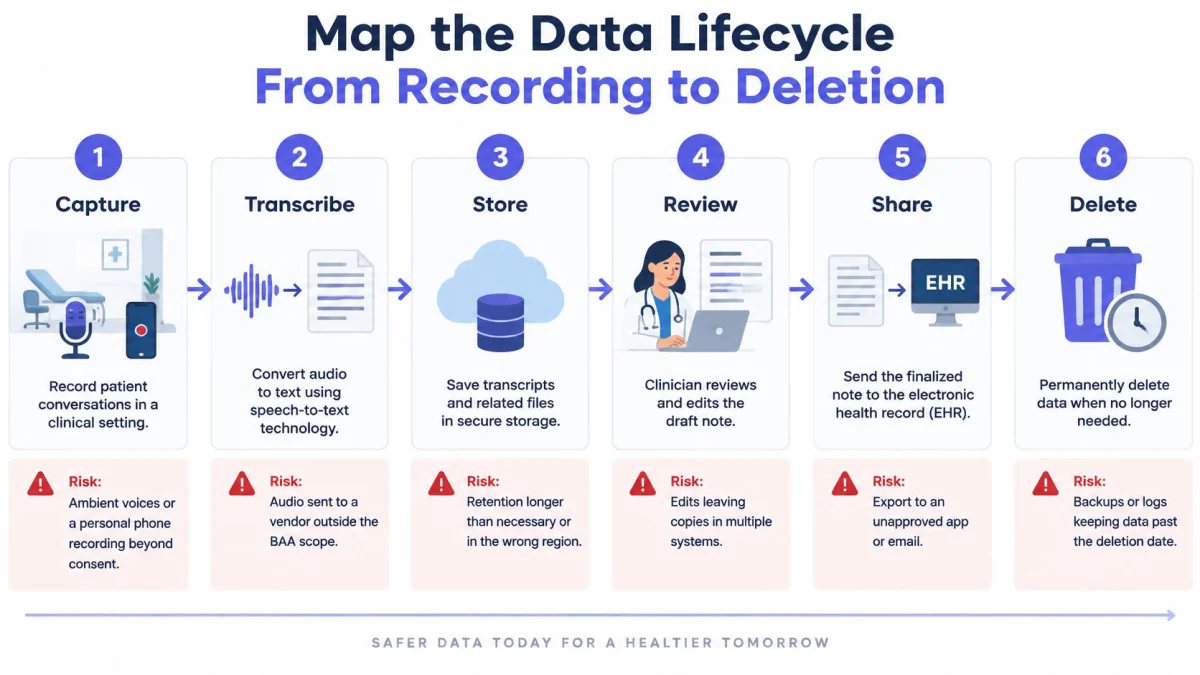
The path from microphone to deletion
- Capture. The microphone records in the room or on a phone. The risk is a device that's lost, shared between clinicians or left open between patients.
- Offline buffer. Poor signal means audio waits on the device. The risk is unencrypted audio sitting in local storage after the visit ends.
- Upload. Audio moves to the vendor's environment. The risk is a transfer to a service that isn't inside the BAA.
- Speech-to-text. The transcript is produced with speaker separation. The risk is a misattributed speaker, which changes who reported which symptom.
- Note and task generation. A language model drafts the note, assessment and follow-up tasks. The risk is an inference written in the same voice as a documented fact.
- Clinician review. The clinician edits and approves. The risk is a note signed unread at the end of a long clinic day.
- EHR transfer. The note enters the patient record. The risk is pasting into the wrong chart, or into a system that stores a second copy nobody tracks.
- Archive. Sessions stay available for restore. The risk is retention that outlives its purpose because nobody set a limit.
- Deletion. Audio and transcripts come off the system on schedule. The risk is copies that survive in exports, email and screenshots.
- Backups and support access. Copies and vendor staff sit outside the main application. The risk is access that no log in your practice shows.
Stage seven has two versions and the difference is human. PatientNotes integrates directly with Semble; every other EHR is served by copy and paste. If yours is a paste workflow, the paste step is a named risk in your assessment, not an afterthought. Check which path your record uses before go-live, and write it into the map.
The same failure mode appears in customer-facing AI, where context leaks through logs, prompts and vendor tooling rather than through the main product: how AI agents leak customer context is a useful primer on the pattern.
Here's the difference between a note that's signed and a note that's defensible.
Finish by putting the map on one page and attaching it to the risk analysis. Recheck it whenever the app, the model, the storage region or an integration changes, because each of those changes redraws at least one arrow. A recording app chosen for phones with poor signal is worth reading up on in medical recording app terms, since offline capture is exactly where stages two and three collide.
Audit Logs, Access Rights and Breach Response Steps
An audit record is only useful if it can answer a human question: who opened this patient's note, when, and from which device. The Security Rule requires audit controls for systems that contain or use ePHI, and HHS defines them as hardware, software and procedural mechanisms that record and examine activity in those systems (HHS Security Rule). Reviewing the logs is therefore a practice task as much as a product feature.
What a usable audit record contains
- User identity. A named person, which means a unique login rather than a shared front-desk account.
- Timestamp. Date and time to the minute, in a timezone the practice understands.
- Action type. Recording started, note viewed, note edited, note exported, recording deleted.
- Patient or encounter identifier. Enough to tie each view to a visit that occurred.
- Device or session. Phone, desktop, and the network it came from.
Set a routine. Check exports and deletions weekly, because those are the two actions that move PHI out of the system or destroy it. Sample note access monthly and confirm each view matches a patient the clinician saw that day.
An audit log nobody reads is a filing cabinet, not a control.
Seven steps when a security incident is suspected
- Contain. Disable the affected account, or pause recording for that clinician, before investigating anything.
- Preserve. Keep the logs, the messages and the vendor's incident record before anything is cleaned up or rotated out.
- Assess. Identify which PHI was involved, how many people it affects, and whether it was unsecured.
- Notify. Follow the reporting duties in the BAA and tell both the vendor and, where you're the covered entity, your own escalation chain.
- Notify patients and regulators as your HIPAA breach obligations require, on your timeline, not the vendor's.
- Document. Record the incident, the outcome and the fix in enough detail that a reviewer six months later can follow it.
- Reassess. Update the risk analysis and retrain whoever needs it. Repeat mistakes are the ones regulators notice.
Business associates carry their own version of this duty: they must identify and respond to suspected or known security incidents, mitigate harmful effects where practicable, and document incidents and their outcomes. That's why the practice has to ask how incidents are recorded, not only whether they're handled. A written template saves hours you won't have during an incident, and a cyber incident response plan sample gives you the structure to fill in beforehand.
PatientNotes states that it uses audit logs, encryption in transit and encryption at rest. Those claims belong in your risk analysis file next to your own access policy, not in place of it.
Before go-live, ask for a sample audit log and the name of the person who receives an incident report. If neither exists, the review process you just planned has nothing to run on.
Clinician Review Before Any Note Is Signed
The most useful evidence on ambient notes is also the least flattering to the software. A 2025 peer-reviewed evaluation compared large-language-model-generated ambient notes with physician-authored notes across multiple specialties. The generated notes were comparable in overall quality and often more thorough and better organized. They were also less succinct and more prone to hallucination. In that evaluation, physician-written notes were preferred on accuracy, succinctness and internal consistency, with statistically significant differences for succinctness (p < 0.001) and internal consistency (p = 0.004) (evaluation indexed in PubMed Central).
Read that as a design brief. Structured drafting is worth having; unreviewed drafting is where the risk lives.
Two failures show up constantly. A patient mentions they stopped a medication three weeks ago, and the draft lists it as current therapy. A patient describes fatigue without ever raising chest pain, and the draft includes a negative finding the transcript doesn't support. Both read perfectly. Both are wrong in the record that gets billed and, eventually, defended.
A fluent draft is not a verified record. Sign only what you have checked against the encounter.
The review routine for every note
- Confirm who said what. Check speaker attribution on the facts that drive the plan.
- Check every diagnosis against what was discussed in the visit.
- Check medications, doses and allergies line by line. The highest-harm errors cluster here.
- Check each negative finding. Delete anything the transcript doesn't support, especially unsupported normals.
- Check follow-up instructions and tasks for timing and owner.
- Correct uncertain passages rather than leaving vague wording that flatters the draft.
- Only then sign, and let the system log the difference between the AI draft and the signed version.
PatientNotes is built around this sequence: the AI drafts the note from the recorded encounter, and the clinician reviews and approves it before it enters the record. The tool carries the typing. The clinician carries the judgement.
HHS draws the same line. Its AI strategy frames AI as appropriate for standardized administrative work while reserving interpretation, decision-making, review and improvement for humans (HHS artificial intelligence strategy). Documentation is the administrative work. The clinical judgement in it stays yours.
Code suggestions follow the same rule. Treat every ICD-10, CPT or CDT suggestion as advisory, validate it against the encounter, and never let a suggestion submit itself. Any code that reaches a claim without a human check is a billing risk sitting on top of a clinical one.
Write this routine into the practice policy so it holds when memory doesn't. The clinician who needs it most is the one finishing charts at 9pm.
Patient Consent and Recording Notice in Practice
The question practices ask is narrower than the compliance literature assumes: is a BAA enough, or does the patient have to agree too? They're separate questions. A BAA governs the vendor and the PHI. Patient consent governs the person in the room, and it's about the act of recording, not the paperwork behind the tool.
HIPAA authorization and consent aren't interchangeable. Authorization is a signed permission for a defined use or disclosure of PHI; consent here is the patient agreeing to be recorded at all. State wiretapping and all-party-consent laws can add obligations a federal analysis never mentions. A technically compliant deployment can still fail on trust.
The consent workflow, step by step
- Notify before the visit, through the booking message or intake form, so nobody is surprised mid-sentence.
- Explain in two sentences what is recorded, why, and whether the audio is kept.
- Ask for verbal permission at the start of the visit and note the answer.
- Offer a non-recording option without penalty, whether that's a handwritten note or dictation after the visit.
- Record the decision in the clinical note itself, so the next clinician can see it.
- Set a process for edge cases: minors, caregivers in the room, interpreters, phone visits and telehealth.
Say a parent brings a child in for a follow-up. The notice arrives with the appointment reminder, the parent declines recording at the desk, and the clinician documents that choice and writes the note without the tool. No negotiation at the chair, no awkward pause in front of the child.
The research supports doing this properly. In a 1,330-person preimplementation survey, 39% of comments raised documentation-accuracy concerns and 15% raised privacy concerns, and the study recommended advance education, explicit verbal permission, an opt-out, and recording consent in the note (JMIR Medical Informatics study). A Canadian public survey found most respondents were reluctant about future AI-scribe use, even though a majority trusted documentation when humans remained responsible for oversight. What patients responded to was a clinician still checking and owning the note.
Say it plainly: the notice should read like a sentence a receptionist would actually say out loud.
UK practices should confirm their own regulator's guidance on recording consultations and on consent before the first recorded visit, since the US frame doesn't carry over. The test is the same either way: a patient who understands what's happening can say no, and the note gets written regardless.
Common Pitfalls and How to Fix Them
At 7 p.m. on a Friday, a clinician signs five AI drafts without reading the risk sections or the medication lists. Three weeks later, she cannot reconstruct why a safety plan changed, and the signed note is the only record of the encounter. Every other pitfall on this list is cheaper to fix.
Pitfalls, consequences and fixes
| Pitfall | What it causes | Fix |
|---|---|---|
| Treating encryption as the BAA | No contract covers PHI handling, so vendor duties are unclear | Require a signed BAA before the first recording |
| Auto-submitting suggested codes | Unvalidated ICD-10, CPT or CDT codes reach claims | Keep code suggestions advisory and validate them against the encounter |
| Using US code sets for UK records | US-specific code suggestions may not fit UK records or claims | Apply local coding rules outside US billing |
| Recording without notice | Patients learn about recording mid-visit and lose trust | Send notice before the visit and ask at the start |
| Recording on personal phones without a passcode | A lost or unattended device exposes PHI | Require device passcodes, remote wipe and logout on shared devices |
A UK clinic hits a different wall. It copies US code suggestions into local records because the software displayed them next to the note, and nobody checks whether the codes belong in that claim.
The code-set confusion is avoidable. ICD-10, HCPCS, CPT and CDT are distinct code sets under HIPAA administrative simplification, and CMS describes CDT as the Code on Dental Procedures and Nomenclature, maintained by the American Dental Association, covering dental procedures and supplies (CMS coding overview). Each set has a different maintainer and a different purpose. PatientNotes states that its ICD-10, CPT and CDT suggestions apply to US billing only and are suggestions for clinician review.
The device row causes harm in a quieter way. A phone without a passcode can hold a full day of recordings and transcripts, and a device left in a taxi turns a workflow shortcut into a potential breach report.
Why these mistakes keep happening
Staff trust a fluent paragraph. Vendor pages lead with time saved. The BAA feels like the finish line when it is the starting point. None of that is anyone's fault, and all of it repeats until the checklist becomes part of onboarding.
Run the table during the first month of use, then again after any change to the app, the templates or the team.
Confirm the BAA Before Your First Recorded Visit
A signed BAA starts the compliance file; the practice keeps that file current after go-live. PatientNotes operates as a Business Associate under HIPAA, and customers who use the service to process PHI agree to its Business Associate Agreement, which is incorporated into the Terms by reference. The vendor also states that the service is compliant with HIPAA rules for protecting patient health information and maintains administrative, physical and technical safeguards for PHI. Treat those statements as the vendor half of the record; the other half is your own check of devices, access, consent and review.
How PatientNotes maps to the Section 1 checkpoints
| Section 1 checkpoint | PatientNotes stated position | Practice verification to keep with it |
|---|---|---|
| Contract and permitted use | BAA included; service operates as a Business Associate | Signed copy filed before recording; permitted uses and incident reporting read; effective date tracked |
| Capture, storage and transmission | Ambient listening for in-person, phone and telehealth visits; encryption in transit and at rest | Phones and shared devices covered by passcodes, remote wipe and logout rules; retention and deletion path written down |
| Accounts and audit trail | Team invitations, roles and audit logs | Unique login for each clinician and reviewer; leaver access removed; named person reviews logs on a set schedule |
| Note output and follow-through | Draft notes must be reviewed and approved before use; ICD-10, CPT and CDT suggestions apply to US billing only | Each note checked against the encounter; codes validated for the claim; consent notice, opt-out and edits recorded |
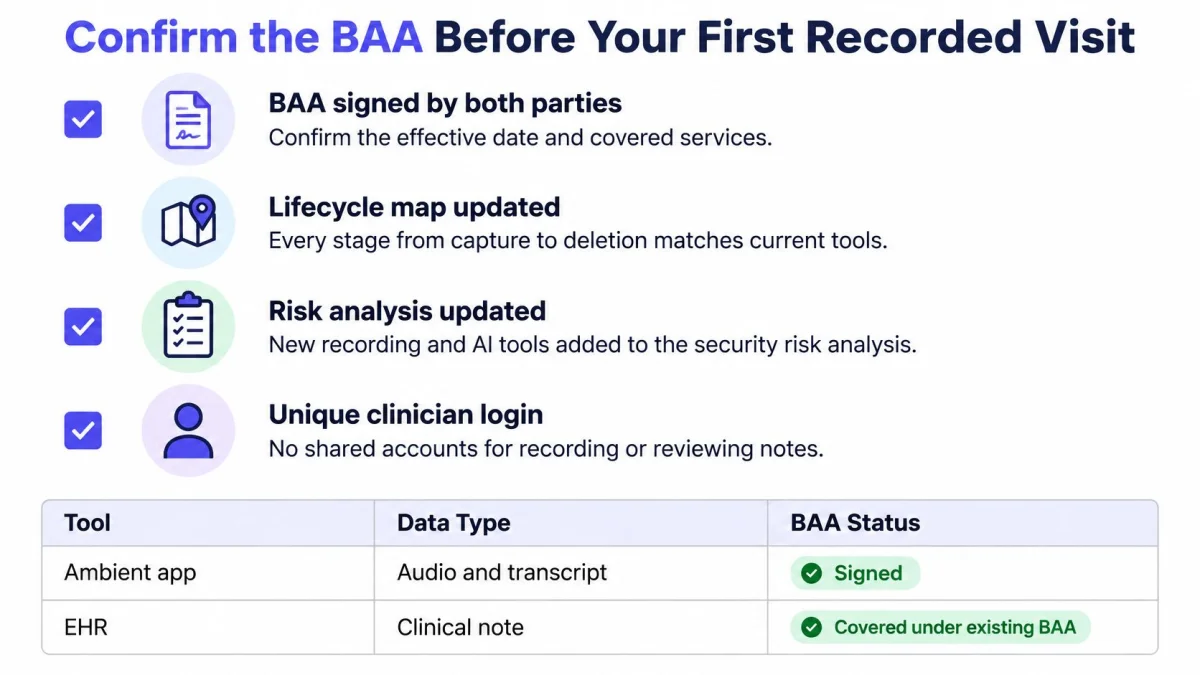
The go-live checklist
- Keep the recorder off until the gate items are done: signed BAA filed, lifecycle map and risk analysis updated, and unique logins issued to every clinician and reviewer.
- Date the BAA against the first recorded visit, then store it in the compliance file.
- Write the consent notice and opt-out script, and rehearse the opt-out once so staff do not improvise it.
- Run non-patient audio during the 7-day free trial, which needs no credit card, and confirm that draft-to-signed edits and audit events are visible.
- Assign code checking for US billing, including who reviews ICD-10, CPT and CDT suggestions and where that decision is recorded.
- Fit templates to your visit types, using the specialty library across 37 specialties or the AI template builder where a fixed note shape would create extra edits.
- Set the signing routine, with a named owner for late notes, addenda and any note corrected after export.
Pricing stays per seat: $70 per user per month billed monthly, or $50 per user per month billed annually ($600 per year), with no contract, cancel-any-time terms, a 14-day money-back guarantee, no enterprise tier and no sales call.
The software can draft quickly; it cannot sign. Responsibility stays with the clinician for the note, the code and the consent record. The vendor supplies the pipeline. The practice supplies the judgement.
To test the workflow without sitting through a demo, PatientNotes records the visit on the web or the native iOS app, drafts the note in your template and language, and leaves every signing decision with you. The 7-day free trial needs no credit card, and the BAA is included. Start at PatientNotes.